We Are Creative Design Agency

Lorem ipsum dolor sit amet, consectetur adipisicing elit. Illum, fuga, consectetur sequi consequuntur nisi placeat ullam maiores perferendis. Quod, nihil reiciendis saepe optio libero minus et beatae ipsam reprehenderit sequi.

Find Out More Purchase Theme

Our Services

Lovely Design

Lorem ipsum dolor sit amet, consectetur adipiscing elit. Praesent feugiat tellus eget libero pretium, sollicitudin feugiat libero.

Read More

Great Concept

Lorem ipsum dolor sit amet, consectetur adipiscing elit. Praesent feugiat tellus eget libero pretium, sollicitudin feugiat libero.

Read More

Development

Lorem ipsum dolor sit amet, consectetur adipiscing elit. Praesent feugiat tellus eget libero pretium, sollicitudin feugiat libero.

Read More

User Friendly

Lorem ipsum dolor sit amet, consectetur adipiscing elit. Praesent feugiat tellus eget libero pretium, sollicitudin feugiat libero.

Read More

Recent Work

Thursday, August 31, 2017

Teacher Resources - education and edtech - all free

Teacher Resources - education and edtech - all free and very useful

General:


EdTech Resources:


-

Monday, August 21, 2017

Welcome Back to School - Great Resources for Teachers


Welcome back to school! I hope everyone had a great summer and was able to relax and recharge. Most schools around here start next week, with new teachers starting this week.

The beginning of the year is always a little crazy for all teachers. Getting your room setup, implementing new ideas into your lesson plans, getting to know your students, and just settling back in to the routine can be busy and stressful. Remember to not over do it and take time for yourself.

One thing I've done in the past that helped me is using a check list of everything I have to do when school starts, including setting up my room (computer, bulletin boards, etc), things I want to post in my room, lesson ideas and more in Evernote. I modify it each year, adding new things for the following year.

Here are some more tips, resources, and help to get your school year started on a positive note, and keep it that way.

Advice to New College Graduates about to enter the Teaching profession

Summary of new teacher tips, urban schools issues, technology resources


Google for Educators - Google has a huge number of free resources for teachers and students. Check them all out (they're all free).

Microsoft Education Resources - resources for admin, IT and teachers

Evernote for Education Resources - the ultimate note taking, web clipping, lesson planning resource

Create a Personal Learning Network - a PLN is an excellent resource for help, advice, and sharing ideas.

Overview of some free technology that can help you be more organized and efficient.


Related:

List of What Makes a Good Teacher - created by students

Great resources for New Teachers - advice, support, and training

List of some great apps for Education for all different projects


Great Apps for Education


·         Screen casting:
·         Markup and Edit Photos:
o   Microsoft Remix 3D https://www.remix3d.com/
·         Note taking:
o   Google Docs
o   Google Keep
o   Evernote https://evernote.com/ (desktop app is very powerful)
·         Creative App Bundle (WeVideo, Soundtrap, Explain Everything):
o   https://edu.google.com/products/class-content/- video editing, sound editing, online whiteboard with recording
·         Video Editing:
o   Animoto https://animoto.com/
·         QR Code Reader:
·         Adobe Spark:

o   https://spark.adobe.com/ - images, videos and more


.

Microsoft Education Resources - nice collection for Admin, IT, and Teachers


Microsoft Education Resources
Microsoft

Microsoft in Education main site

Leadership Resources - transform your schools and classrooms with Microsoft Tools and Resources
School leader tools
OneNote for Administrators
Microsoft Showcase Schools
Microsoft School Transformation Toolkit


IT Solutions
IT management and deployment
Intune for Education
Student lifecycle management
Business management
Research management

Teacher Resources
OneNote for Teachers
OneNote in Education
Microsoft Digital Literacy Curriculum
Teaching with Technology: Overview
21st Century Learning Design: Overview
Microsoft Educator Network
Office training and tutorials
Free Tools For Teachers


More Microsoft Resources:
http://educationaltechnologyguy.blogspot.com/search/label/Microsoft


.

Thursday, March 2, 2017

Tools to work with, annotate, create and convert PDF files


PDF, or Portable Document Format, files are ubiquitous these days. The format is a great way to share files since every operating system, including mobile devices, has free software available to read the files. Creating these files, manipulating them, marking them up, editing them, and converting them to other formats are all needed activities for many people. Here are some great resources to use with PDF files. 


Tuesday, February 21, 2017

Productivity Apps And Gadgets for College Students Everywhere (guest post)


Productivity Apps And Gadgets for College Students Everywhere


Learning how to be productive and work efficiently, is one of the biggest trends of the year for business men and women this year. This trend has even passed on to many college students as they try to juggle schoolwork, jobs, volunteering commitments, etc. Listed below are some of the best apps and gadgets that college students can use to up their productivity during the craziness of their semester.


Any.do

Any.do is an app that can be used to organize all of your tasks into a very stylish to-do list. The app is convenient because it is simple to use, and can be synced across all of your electronic devices. Students can even use their voices to create tasks when they are in a rush, or on the go. As tasks are entered they can be edited with different priorities so that your tasks are completed in a timely manner.


Dropbox

Students can use dropbox to upload all of their important course artefacts into one place. Dropbox allows users to upload files, videos, pictures, etc. into an online catalog. This eliminates the fear of losing work due to a crashed computer or other technical difficulties. Dropbox only needs an internet connection to work.


Scribd

Scribd is one of the largest libraries of documents and books online. This online database contains over a million files that can help with your studies. These files are uploaded from people all over the world and are categorized by topics for easy searching. Within Scribd, students can create personalized libraries that contain notes and books they need to use.


EasyBib

One of the hardest parts about writing a college paper is correctly citing and annotating your sources. EasyBib is designed to correctly create a list of citations for you. Citations can be created in MLA or APA style format. EasyBIB is available in app form, and also online. The app has a search feature that lets you look for your source. Once the source is found the citation is automatically done for you. The citation can then be directly copied to your bibliography.


Studious

Studious is an app that assists students with remembering the correct date and time for quizzes and exams. It also reminds students of important homework deadlines, as well as class schedules. Students just need to enter any information about their class, professor, and deadlines and the app will help them remember.


Evernote Moleskine Smart Notebook


With this gadget, notes can be taken with pen and paper and then translated digitally. The notes are translated using the page camera on the Evernote app. The notes are then stored within the app which gives you a multitude of supplies for customization. The notes can be synced across multiple devices for easy access.


Otterbox Charger

The Otterbox charger is perfect for the college student with long hours. The case can charge your phone while you are on the go. It contains the power to extend your battery life more than twice of the normal battery life. Once your phone is at a certain level it automatically stops charging in order to save battery.


External Hard Drive

An external hard drive is used to backup any files, photos, and other artefacts that you work on. If anything happens to your computer, you have your external hard drive as a form of insurance for your work. External hard drives are normally fairly inexpensive and light. Some hard drives can also be used with mobile phones as well.


Many college students have felt that the apps/gadgets mentioned above have helped them to minimize distractions, keep track of their work, and get through student life more conveniently. In addition to these apps and gadgets there are also different web extensions that can assist students in the same way.


Related:

Evernote for Education

My Favorite Resources for Teachers and Students


-

Wednesday, February 8, 2017

K-12 Blueprint - tools, research, devices, best practices and more to support effective EdTech projects

Home

K12Blueprint is a great, free resource for technology in education. There are toolkits with information and resources for developing and deploying technology initiatives, information on choosing the right device for your schools, software and apps, curriculum, news, research, and blogs from educators and edtech leaders. The information and resources are timely, relevant and easy to use.


There are even free downloads of 3 different books on edtech and education:


Here are the list of toolkits:


There are a ton of resources and information on this site - take a look around and see what it has to offer.

It is sponsored by Intel EducationTech&Learning, and Clarity Innovations.


Related:

Ed Tech Pilot Framework - excellent resources for all schools 

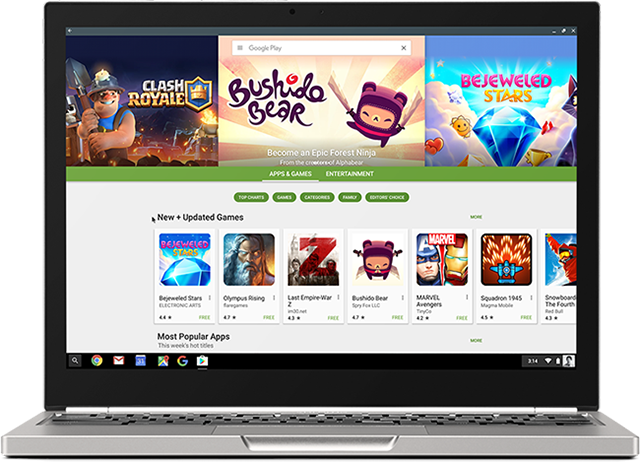
Android on Chromebooks! Here are some resources and apps to check out


Android has come to Chromebooks and is available on EDU Domains!


This opens up a whole new world of possibilities with Chromebooks, adding thousands of great apps, features and capabilities.


Here are the resources for Admins to get Android apps enabled for their domain:


Here are some great suggestions for Android apps (and some web apps):

F101_Pixel2_Silver_PlayStore.width-800.png

Android App Suggestions for Chromebooks (all are free)


I've been using Android apps on my Acer C738T with my personal account for quite a while now and they work great. Handwriting input, offline sync and much more. 


A new generation of Chromebooks, designed for millions of students and educators https://blog.google/topics/education/new-generation-chromebooks-designed-millions-students-and-educators/ (Acer and Asus convertible’s with stylus)

A new generation of Chromebooks, designed to work with millions of apps https://blog.google/products/chromebooks/new-generation-chromebooks-designed-work-millions-apps/ (Samsung Plus and Pro)


--

Wednesday, November 23, 2016

Ed Tech Pilot Framework - excellent resources for all schools


Digital Promise has released an EdTech Pilot Framework which provides a step-by-step process to help education leaders and technology developers run successful educational technology (ed-tech) pilots.

It is very simple to use and read and has links for more information on each step.

Here is the link to the original article: http://edtech.digitalpromise.org/

One thing to remember - you don't have to do these projects alone. There are plenty of resources available to help you. In addition, check with your technology vendors to see what they have for planning and support resources to help you.

Here is the Framework:


  1. Identify Need
  2. Discover and Select
  3. Planning
  4. Train and Implement
  5. Collect Data
  6. Analyze and Decide
  7. Negotiate and Purchase
  8. Summarize and Share


Related:

K-12 Blueprint site updated - resources for planning and implementing EdTech 
Tech&Learning - free Edtech magazine, website and resources for educators


-

Some Excellent Resources for Google for Education for Teachers and Admins


Google for Education, which includes G Suite for Education, Chromebooks, and content, is one of the most popular, and most updated, platforms for education. Here are some great resources for IT, Teachers, Students and more.


Google for Education main site: https://www.google.com/edu/ 


Getting started with G Suite for Education: https://support.google.com/a/answer/2856827


Google Device Showcase - Chromebooks, Chromeboxes and more 


Google for Education Transformation Center - resources, examples and tips for transforming your classroom and school


Class Content: https://www.google.com/edu/products/class-content/ - content and apps that have been approved by Google


Benefits of Google Apps and Chromebooks - lots of resources, tips and ideas
Google Apps Administrator Help Site - for G Suite Admins
Apps Status Dashboard (shows issues and outages) - for Admins

Google for Education Training Center - excellent resource for teachers on using Google Apps in the Classroom 

There is also a thriving community of admins and teachers on Google+. Take a look around. 


Related:


-

    Resources to find Funding for Schools and Technology


    Schools are always looking for ways to find funding for projects, especially for technology. Here are some great resources that I have used in the past.


    1. Edutopia - The Big List of Educational Grants and Resources - Get a roundup of educational grants, contests, awards, free toolkits, and classroom guides aimed at helping students, classrooms, schools, and communities. Check this page weekly to get the latest updates! https://www.edutopia.org/grants-and-resources


    2. GetEdFunding - GetEdFunding is a free and fresh grant-finding resource, dedicated to helping educators and institutions identify the funding they need in budget-tight times. http://www.getedfunding.com/


    3. Lowe’s Toolbox for Education http://www.toolboxforeducation.com/


    4. Toshiba America Foundation grants – K-5 and 6-12 - http://www.toshiba.com/taf/


    5. Device Grant Listed (list maintained by Google, has a lot of different grants listed) https://goo.gl/WD6YpS


    6. THE Journal K-12 Grant Opportunities and Ed Tech Event Listings https://thejournal.com/articles/list/listings.aspx


    7. Edsurge - Where to Find Money for Your School's EdTech Purchases https://www.edsurge.com/news/2016-11-21-where-to-find-money-for-your-school-s-edtech-purchases


    More resources:
    • Federal grants from various agencies are listed at www.grants.gov
    • State and local grant opportunities can often be identified by state legislative offices. 
    • Micro-funding through school- and classroom-specific grants can yield substantial results. Often donors are willing to fund projects whose impact they can directly observe. Such organizations as Donors Choose, Class Wish, and Adopt-a-Classroom facilitate individual donations. 
    • Contact local businesses to see what programs they have available to support schools. 


    Don't be scared to apply for a grant - you may just get it!


    Good luck and happy hunting.


    -


    Thursday, October 27, 2016

    SmartFeed - quality, curated content for kids


    SmartFeed is the trusted platform & tool for parents to easily and conveniently curate and manage kid's digital media - across all content and device platforms. By serving up better media to kids, SmartFeed is helping to positively shape the next generation’s mindset in the midst of a media-saturated world.

    As for how it works, think Pandora (curated recommendations) meets Netflix (ease of delivery) with Facebook (like minded community) for Parents.

    Why do we need this? Media is increasingly everywhere, especially in front of our children. Kids find and consume it easily– -- just like junk food –-- but much of it is garbage. SmartFeed aims to change the paradigm: rather than just filtering out the junk, what if we could feed our kids positive, engaging, healthy content instead? Enter SmartFeed!

    A breadth of great content for kids and teens exists....parents just need help finding it. SmartFeed makes finding great media and managing the content your kids consume easy and convenient.


    -

    Monday, October 24, 2016

    ExploreEDU - free #Google #EdTech event in Bethpage, NY - Nov 1 or 2nd - come join us


    Come join CDW-G and Google in Bethpage NY for an Explore EDU Event.

    ExploreEDU is an interactive, discovery-based event designed to teach those new to Google about the transformative power of technology in the classroom

    Bethpage Union Free School District
    10 Cherry Ave Bethpage, NY 11714 

    Register for one of the following available dates: 

    Nov. 1, 2016, 8am - 2pm | Reserve Your Seat

    Nov. 2, 2016, 8am - 2pm | Reserve Your Seat


    CDW Event Contact: Joe McAllister 


    Hosted by Bethpage Union Free School District and CDW, ExploreEDU is an event designed to introduce school technology directors and administrators to Google solutions.

    If you’re interested in discovering how technology can make a difference in your students’ lives or would like to imagine the classroom of the future, please join us.

    You’ll learn about new products and tools, engage in dialogue with peers and embark on a journey of educational insight and adventure.


    Google Inc. is excited to cover the costs for attendees; the cost of items provided is valued under $45 per person. As a reminder, Google Inc. may be a vendor and/or lobbyist employer and Google Inc. employees may be registered lobbyists. If your school/district cannot accept this donation or if accepting the donation would prevent Google Inc. from supplying products or services to your school/district, do not register for this event or forward this invitation to others.


    --

    Our Blog

    55 Cups
    Average weekly coffee drank
    9000 Lines
    Average weekly lines of code
    400 Customers
    Average yearly happy clients

    Our Team

    Tim Malkovic
    CEO
    David Bell
    Creative Designer
    Eve Stinger
    Sales Manager
    Will Peters
    Developer

    Contact

    Talk to us

    Lorem ipsum dolor sit amet, consectetur adipisicing elit. Dolores iusto fugit esse soluta quae debitis quibusdam harum voluptatem, maxime, aliquam sequi. Tempora ipsum magni unde velit corporis fuga, necessitatibus blanditiis.

    Address:

    9983 City name, Street name, 232 Apartment C

    Work Time:

    Monday - Friday from 9am to 5pm

    Phone:

    595 12 34 567