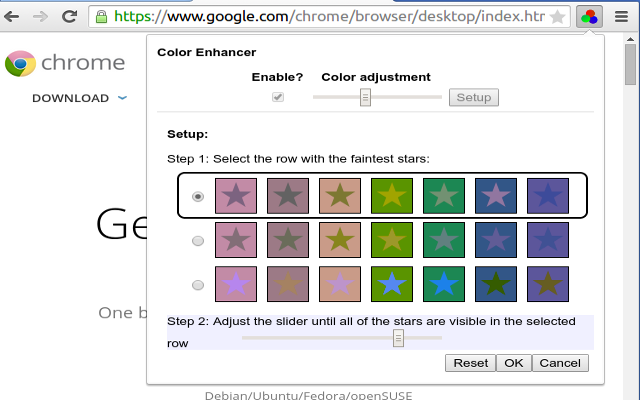
Here is a summary of them with links to more info on each one. I'm pretty excited for these. Many will be great for education, including news, accessibility and more. (Google for Education Resources)

Google AI is the big topic of the day. AI is being implemented in pretty much everything Google does and there are some really amazing things being accomplished. https://ai.google/
- AI - solving problems for users https://www.blog.google/topics/innovation-technology/io18-overview/
- opening AI centers around the world
- transforming Healthcare https://ai.googleblog.com/2018/05/deep-learning-for-electronic-health.html
- diagnosing diabetic retinopathy
- and use eye scan to predict cardiovascular risk
- helping doctors predict medical events and issues before they happen
- Accessibility
- hearing impaired - separating out the noise
- ways to help people with physical disabilities to "talk"
- Morse code tapping to go to G Board to type
- New fresher look to Gmail
- smart compose using AI https://www.blog.google/products/gmail/subject-write-emails-faster-smart-compose-gmail/
- suggests phrases for you, hit tab to autocomplete

- Google Photos and AI https://www.blog.google/products/photos/take-action-sharing-editing/
- 5B photos viewed every day
- new feature - suggested actions - smart actions in context
- share photos based on who is in photo
- one tap to fix exposure/etc
- recognize and convert photo of document to PDF!
- auto color b&W photos
- AI computing power
- next gen TPU 3.0 pod for AI computing
- liquid cooling now needed
- over 100 petaflops (pod is 8x more powerful than last year)

- Google Assistant https://www.blog.google/products/assistant/io18/
- https://assistant.google.com/
- naturally conversational
- there when you need it
- easy to use
- "Holly" is the voice
- using AI (Wavenet) to create a more natural voice now
- adding 6 new voices to Google Assistant
- getting more voices for global
- John Legend coming as a voice of GA (later this year in different contexts)
- more and more actions and features
- works with smart TVs and Netflix
- smart home devices
- find your phone
- on over 500 M devices
- in most major car manufacturers
- 30 languages, 80 countries by end of year
- visually assistive (shows visuals as well as speaking to you)
- understand social dynamics
- new ways to interact besides Hey Google, OK Google
- Continued Conversation - coming weeks
- ask for multiple things at once
- lots of actions - sci fi!
- "Pretty Please" - say please to get Google to do things - and Google responds with comment like "thanks for being polite" - great for teaching kids manners
- later this year
- https://techcrunch.com/2018/05/08/a-google-assistant-update-will-teach-kids-to-say-please/
- Voice and Visual Assistance
- Google Assistant normally voice, adding visuals
- Visual - Smart Displays - LG, Lenovo and 1 other
- integrates with Google Photos, GA, controlled by voice, watch videos and shows, YouTube and YT TV
- show recipes
- Mobile Phones
- immersive and interactive and proactive
- shows images and info along with voice response
- shows smart home controls
- "order my usual from Starbucks"
- more partners coming soon
- proactive - in assistant and swipe up - reminders, day events, and other info right there
- launching on Android in summer and iOS later this year
- MAPs - GA coming to Google Maps this summer - send someone your ETA, do other actions while navigating
- Phone calls
- connect users to businesses in a good way
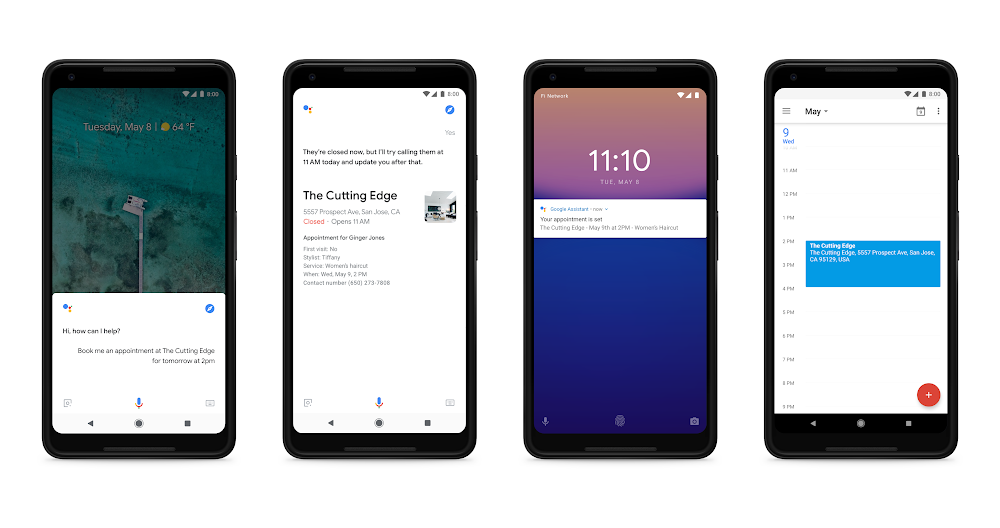
- GA actually makes the call for you and takes care of it naturally - schedule appointment, reservations, etc. https://techcrunch.com/2018/05/08/android-rolls-out-a-suite-of-time-management-controls-to-promote-more-healthy-app-usage/
- Google Duplex - AI, text to speech, natural language, deep learning https://ai.googleblog.com/2018/05/duplex-ai-system-for-natural-conversation.html

- Digital Well Being
- help you separate from your devices
- people get FOMO (fear of missing out)
- should have JOMO - joy of missing out
- across all products and platforms
- understand your habits
- focus on what matters
- switch off and wind down
- find balance for your family
- Android Dashboard
- time spend on phone
- times unlocking phone
- notifications
- apps used
- YouTube - take a break reminders, notifications digest - this week
- Family Link - manage kids screen time https://families.google.com/familylink/
- Be Internet Awesome https://beinternetawesome.withgoogle.com/en
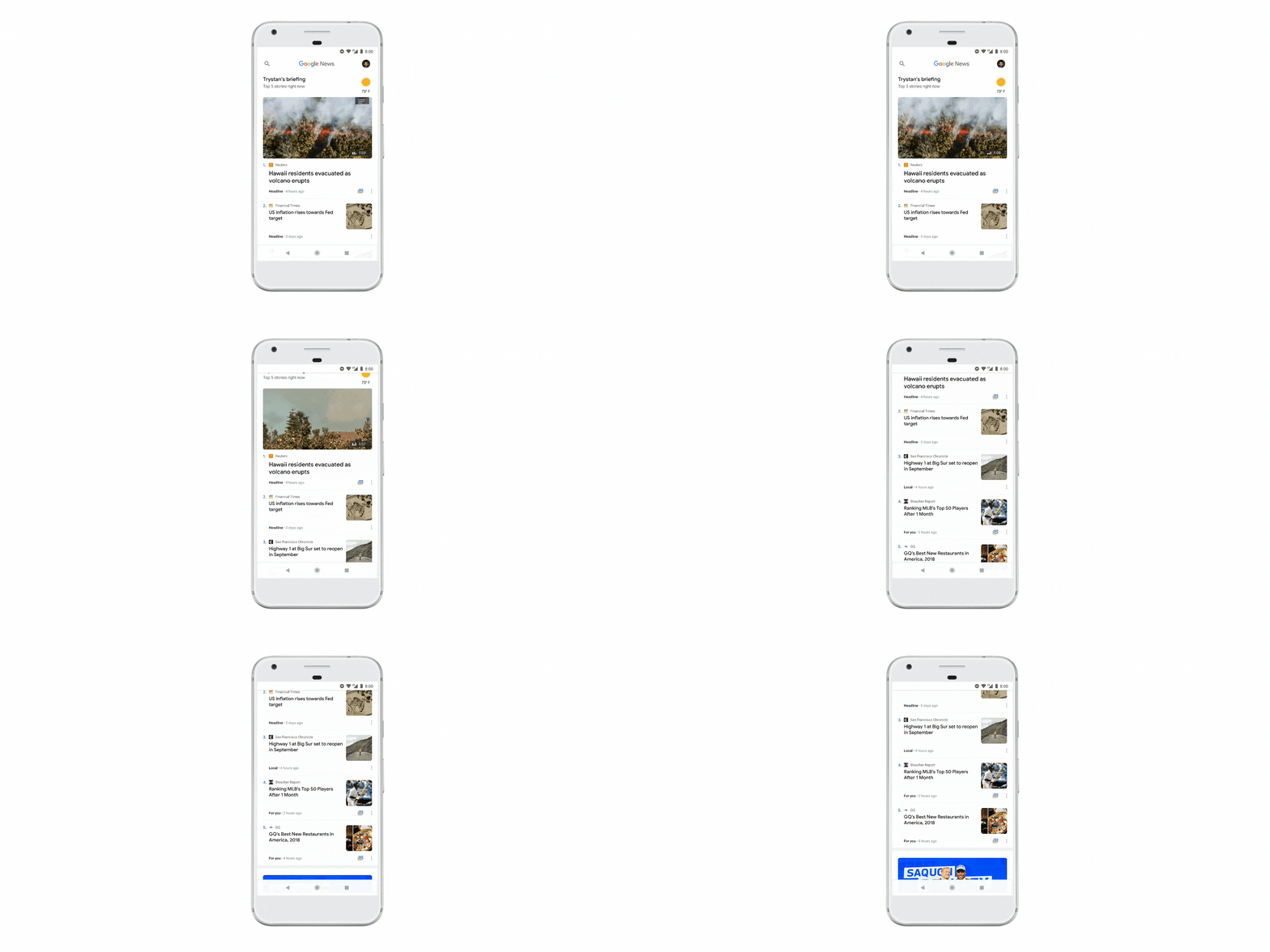
- News https://www.blog.google/products/news/new-google-news-ai-meets-human-intelligence/
- quality journalism
- identify fake news
- remove bad sources
- using AI to find quality products
- Google News
- deeper insight and fuller perspective on topics
- learns what you like
- video news too
- updated app
- Google Material Theme - applied to all apps and for 3rd party apps
- Newscasts - new format - preview of a story across different platform
- Understand the full story
- Full Coverage - complete picture of a story - how it's being reported across different sources and formats. Different context, opinions, fact checks, analysis.
- Everyone has access to the same information
- unfiltered coverage from a range of trusted sources
- Enjoy and support the news sources you love
- Subscribe with Google - use Google account to easily subscribe to publishers
- rolling out on Android, iOS and web today
- Android https://www.blog.google/products/android/android-p/
- open, most popular OS in world
- choice, innovation
- 10 years old
- smarter operating system
- battery life is top concern for users
- Android P - adaptive battery - uses on device machine learning to adapt to your usage patterns to only run certain apps, backup processes on smaller core, and save battery.
- auto brightness based on current lighting conditions, but now take personal preferences and environment - adaptive brightness, learns your preference and does it automatically for you
- App Actions - most used apps, predicted by AI, and actions you might take based on your usage. Connect headphones and it brings up music apps
- Slices - new API to develop interactive snippets of an app in different places in the OS, like in search. https://www.engadget.com/2018/05/08/google-android-p-actions-slices-predictive-apps/
- evolve Android UI
- simplicity
- easier to do things
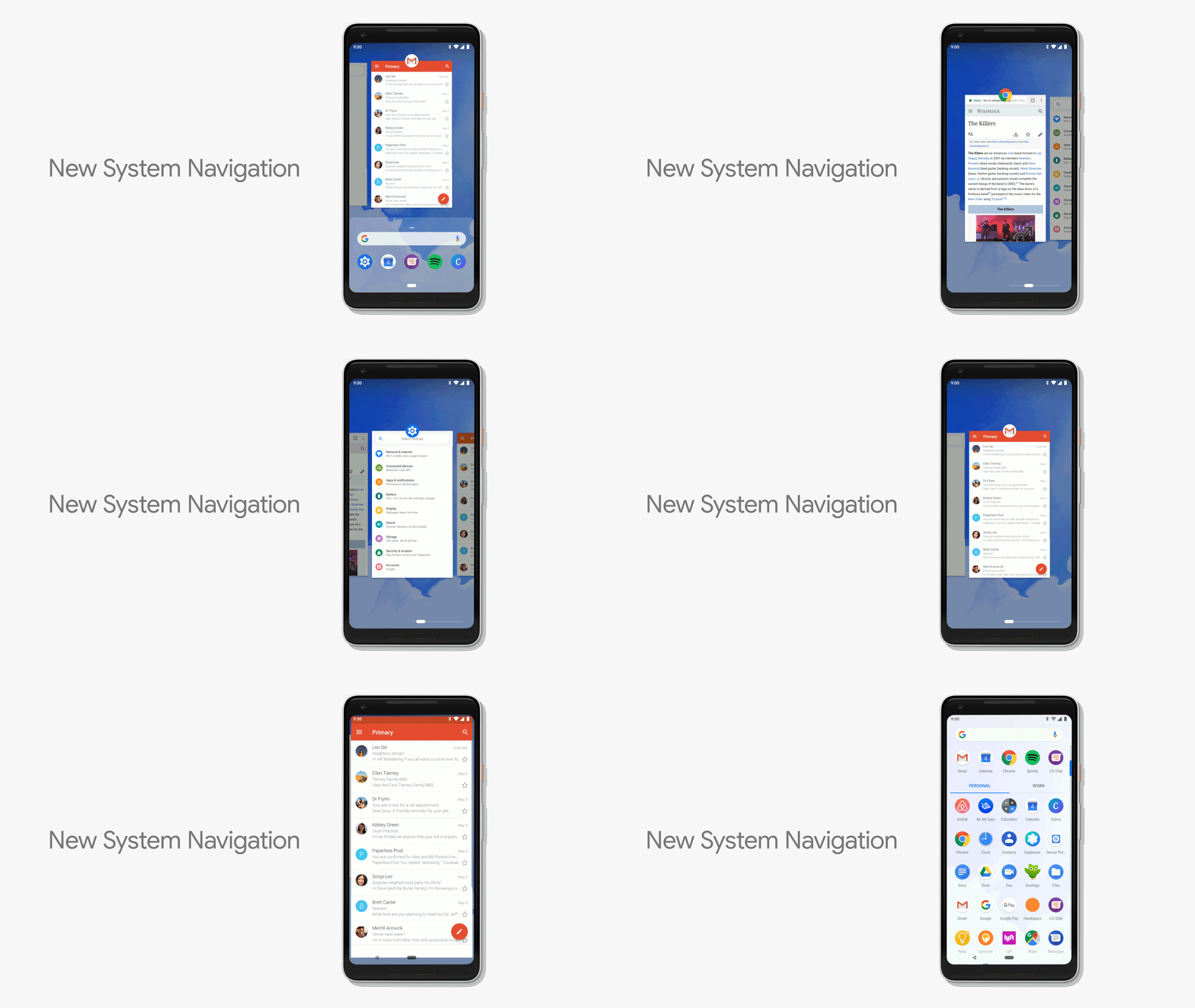
- new system navigation
- easier multi tasking
- single clean home button and gestures
- swipe up to overview, predicted apps
- 2nd swipe up to all apps
- swipe up anywhere
- slide home button sideways to scroll through recent apps
- back button shows up as needed
- smart text selection and actions
- volume control - simplified volume slider - default is media volume
- rotation - lock rotation - unlock rotation button shows up when you rotate phone instead of auto rotate
- better screenshots
- better notification management https://techcrunch.com/2018/05/08/android-rolls-out-a-suite-of-time-management-controls-to-promote-more-healthy-app-usage/
- lessen distractions
- disconnect, balance life and technology
- understand your habits - dashboard on how you are spending your time on device
- meaningful engagement
- Do Not Disturb mode - block visual notifications.
- Shush - turn your phone over on the table and it automatically goes to DND
- Starred Contacts - allow them in even if DND is turned on.
- Wind Down mode - tell GA when you want to go to bed - when that time arrives, it turns on DND and then gray theme screen to help you wind down and go to sleep.
- 100's of improvements in Android P, including Security
- Android P Beta - available on Pixel and 7 flagship devices, today
- Maps https://www.blog.google/products/maps/explore-around-town-google-maps/
- using AI to expand Maps
- over 220 countries are mapped
- 1B+ users
- smarter and more detailed
- automatically add new businesses and buildings from street view and satellite
- business hours, wait time, etc
- parking info
- different routes based on mode of transport
- more accurate traffic predictions
- get more done
- what's happening around you
- uses your info and interests to find things you care about
- new tab - For You - new things near you, trending info, activities, places and more
- Your Match - score based on other things you liked to show you how something matches to your likes
- Planning with others - pick a place together - long press on a place to add it to a short list - share the list with friends to get their preferences and they can vote or add their own places.
- Helping Small Businesses get discovered
- daily posts on events or offers from favorite places
- mapping the world (15 years old)
- Camera in smartphones https://www.blog.google/products/google-vr/google-lens-real-time-answers-questions-about-world-around-you/
- AI and computer vision
- use camera to answer questions - where am I going, what's that in front of me?
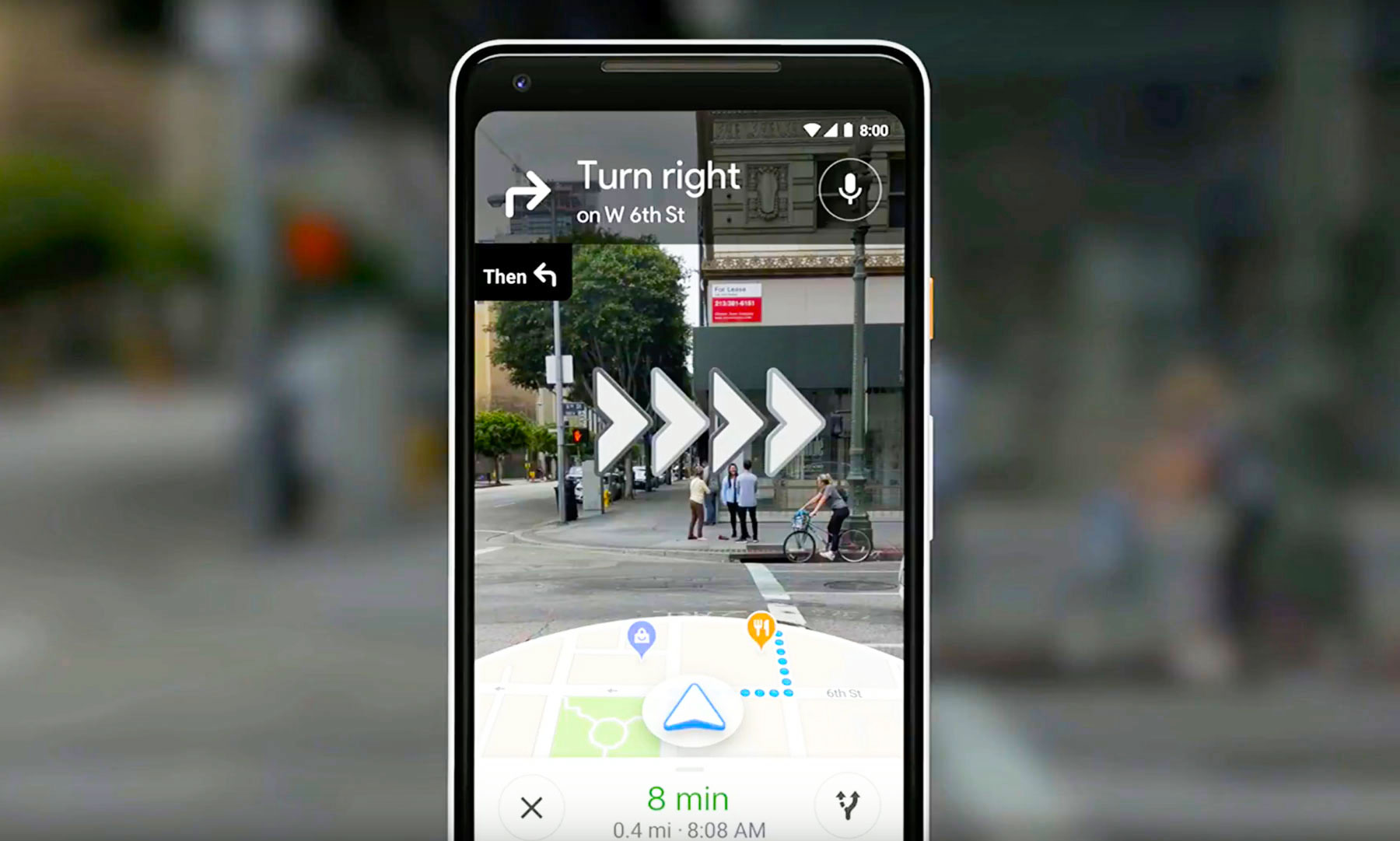
- use camera and street view and maps to reinvision walking navigation
- Maps info over laid on camera view!
- which way, places near by, a guide
- VPS - visual positioning system - based on what camera sees - visual landmarks but more accurate.
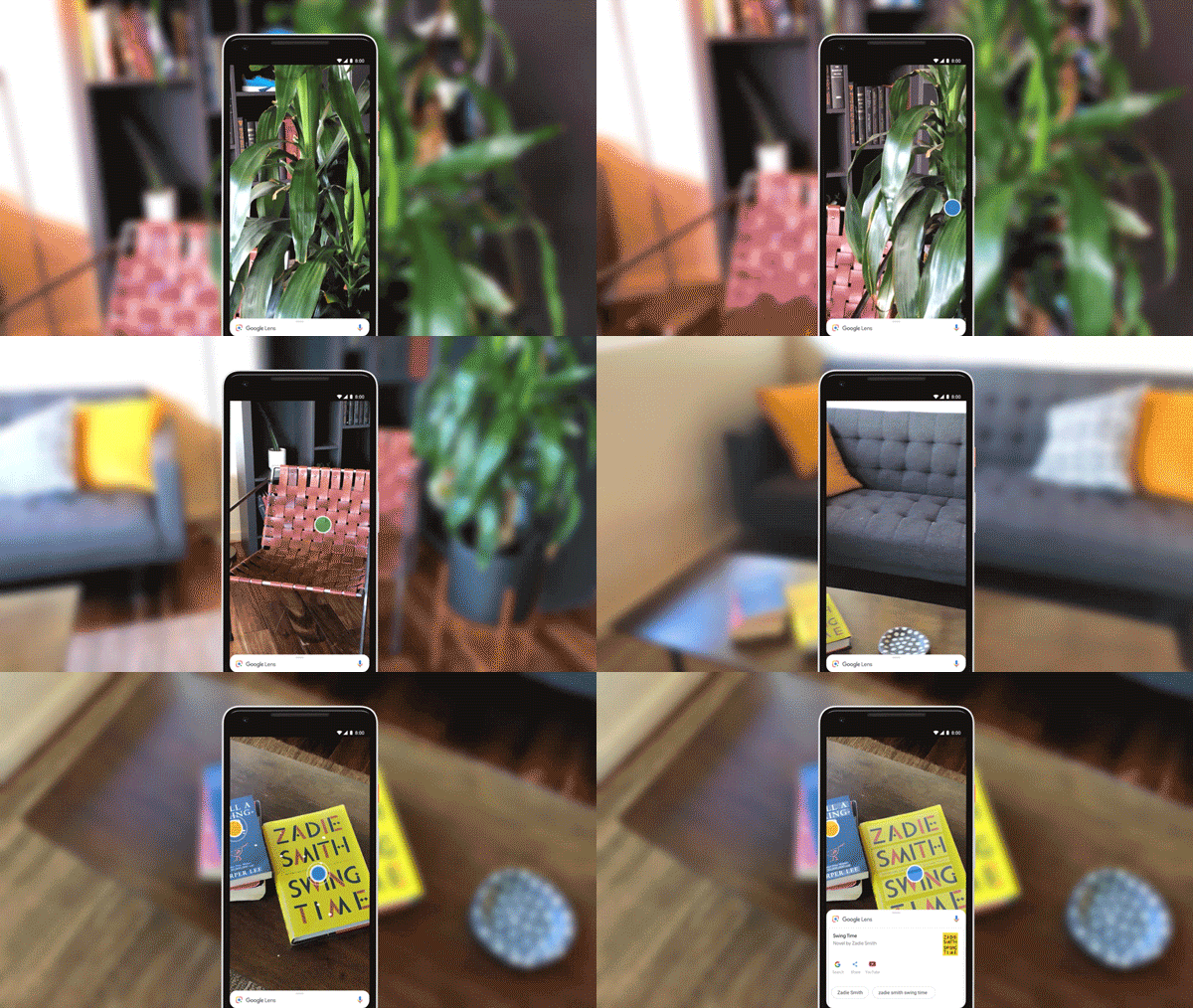
- Google Lens
- get info based on what camera sees
- available in GA and G Photos
- and going right into Camera App on Pixel and flagship devices
- 3 new features
- Smart Text Selection
- Recognize and understand words
- Copy and paste from camera to app - real words on page, sign, etc.
- select a word on a menu and it will show you what it is
- Style Match
- what are things like this thing?
- open camera, tap on item and get info and other things that match style
- Real Time Results
- open camera and Lens starts working instantly to get info for you
- on device and cloud TPUs to power this
- Self Driving Cars - Waymo https://waymo.com/
- part of Alphabet
- fleet of fully self driving cars on public roads
- people are already trying it out in Phoenix
- Waymo early rider program
- 100x reliability and safety
- AI - perception and detection
- finding objects and pedestrians and then avoiding them
- adapting to things like a car going fast even though red light is coming up
- adapting to weather like snow
- safer than human drivers
So cool it feels like Science Fiction!

---