We Are Creative Design Agency

Lorem ipsum dolor sit amet, consectetur adipisicing elit. Illum, fuga, consectetur sequi consequuntur nisi placeat ullam maiores perferendis. Quod, nihil reiciendis saepe optio libero minus et beatae ipsam reprehenderit sequi.

Find Out More Purchase Theme

Our Services

Lovely Design

Lorem ipsum dolor sit amet, consectetur adipiscing elit. Praesent feugiat tellus eget libero pretium, sollicitudin feugiat libero.

Read More

Great Concept

Lorem ipsum dolor sit amet, consectetur adipiscing elit. Praesent feugiat tellus eget libero pretium, sollicitudin feugiat libero.

Read More

Development

Lorem ipsum dolor sit amet, consectetur adipiscing elit. Praesent feugiat tellus eget libero pretium, sollicitudin feugiat libero.

Read More

User Friendly

Lorem ipsum dolor sit amet, consectetur adipiscing elit. Praesent feugiat tellus eget libero pretium, sollicitudin feugiat libero.

Read More

Recent Work

Wednesday, May 9, 2018

Google I/O 2018 - big announcements from the opening keynote - very cool stuff!


#io2018


Google kicked off Google I/O 2018, their developer conference, yesterday, 5/8/18, with a keynote that had some amazing announcements in it. 

Here is a summary of them with links to more info on each one. I'm pretty excited for these. Many will be great for education, including news, accessibility and more. (Google for Education Resources)

Google

Google AI is the big topic of the day. AI is being implemented in pretty much everything Google does and there are some really amazing things being accomplished. https://ai.google/

color pop
  • Google Photos and AI https://www.blog.google/products/photos/take-action-sharing-editing/
    • 5B photos viewed every day
    • new feature - suggested actions - smart actions in context
    • share photos based on who is in photo
    • one tap to fix exposure/etc
    • recognize and convert photo of document to PDF!
    • auto color b&W photos
  • AI computing power
    • next gen TPU 3.0 pod for AI computing
    • liquid cooling now needed
    • over 100 petaflops (pod is 8x more powerful than last year)
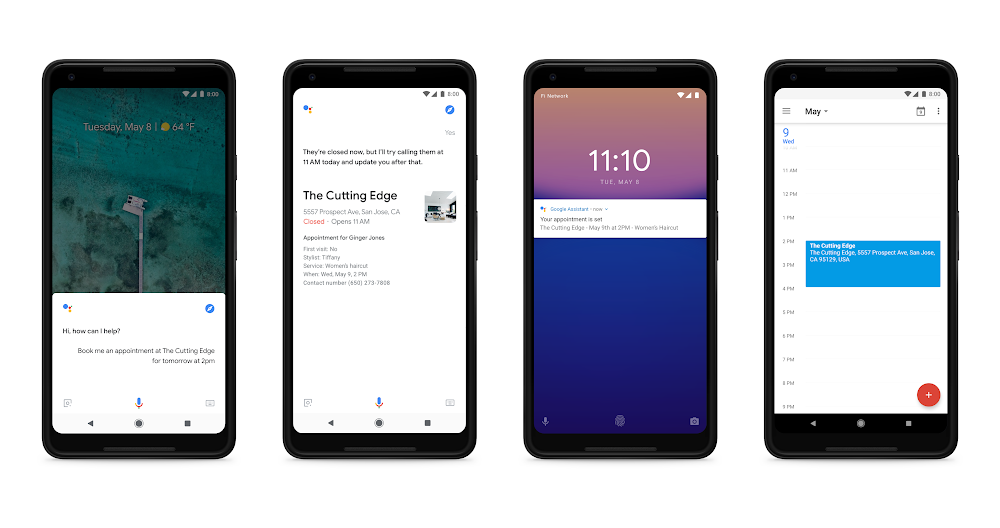
phone calling fom the Google Assistant.png
Image result for google assistant
  • Google Assistant https://www.blog.google/products/assistant/io18/
    • https://assistant.google.com/ 
    • naturally conversational
    • there when you need it
    • easy to use
    • "Holly" is the voice
    • using AI (Wavenet) to create a more natural voice now
    • adding 6 new voices to Google Assistant
    • getting more voices for global 
    • John Legend coming as a voice of GA (later this year in different contexts)
    • more and more actions and features
    • works with smart TVs and Netflix
    • smart home devices
    • find your phone
    • on over 500 M devices
    • in most major car manufacturers
    • 30 languages, 80 countries by end of year
    • visually assistive (shows visuals as well as speaking to you)
    • understand social dynamics 
    • new ways to interact besides Hey Google, OK Google
    • Continued Conversation - coming weeks
      • ask for multiple things at once
      • lots of actions - sci fi!
    • "Pretty Please" - say please to get Google to do things - and Google responds with comment like "thanks for being polite" - great for teaching kids manners
    • Voice and Visual Assistance
      • Google Assistant normally voice, adding visuals
      • Visual - Smart Displays - LG, Lenovo and 1 other
      • integrates with Google Photos, GA, controlled by voice, watch videos and shows, YouTube and YT TV
      • show recipes
    • Mobile Phones 
      • immersive and interactive and proactive
      • shows images and info along with voice response
      • shows smart home controls
      • "order my usual from Starbucks"
      • more partners coming soon
      • proactive - in assistant and swipe up - reminders, day events, and other info right there
      • launching on Android in summer and iOS later this year
    • MAPs - GA coming to Google Maps this summer - send someone your ETA, do other actions while navigating
    • Phone calls
    • Google Duplex - AI, text to speech, natural language, deep learning https://ai.googleblog.com/2018/05/duplex-ai-system-for-natural-conversation.html

  • Digital Well Being
    • help you separate from your devices
    • people get FOMO (fear of missing out)
    • should have JOMO - joy of missing out
    • across all products and platforms
    • understand your habits
    • focus on what matters
    • switch off and wind down
    • find balance for your family
    • Android Dashboard
      • time spend on phone
      • times unlocking phone
      • notifications
      • apps used
    • YouTube - take a break reminders, notifications digest - this week
  • Family Link - manage kids screen time https://families.google.com/familylink/ 
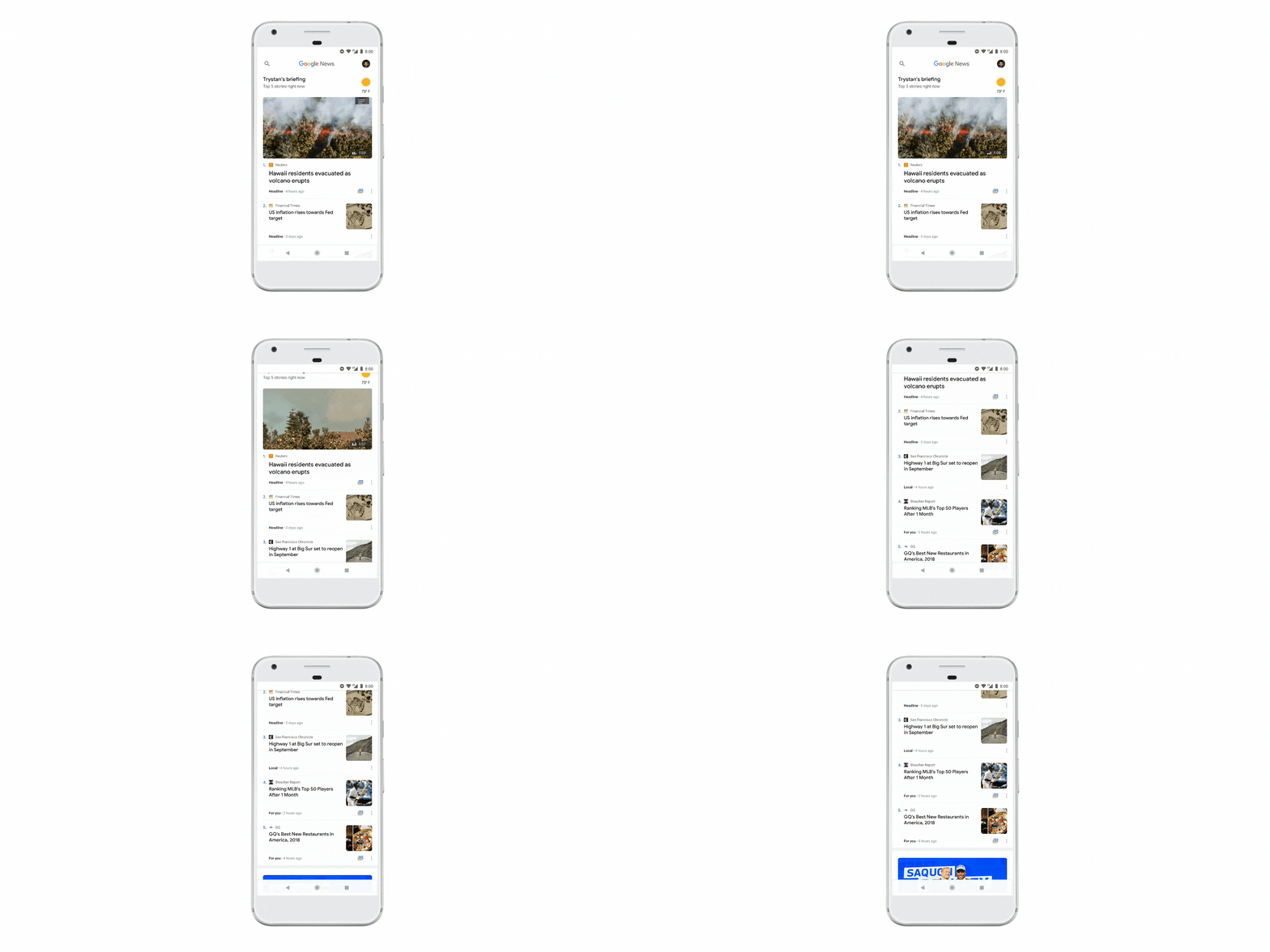
Overview - News.gif
  • News https://www.blog.google/products/news/new-google-news-ai-meets-human-intelligence/
    • quality journalism
    • identify fake news
    • remove bad sources
    • using AI to find quality products
    • Google News
    • deeper insight and fuller perspective on topics
    • learns what you like
    • video news too
    • updated app
    • Google Material Theme - applied to all apps and for 3rd party apps
    • Newscasts - new format - preview of a story across different platform
    • Understand the full story
    • Full Coverage - complete picture of a story - how it's being reported across different sources and formats. Different context, opinions, fact checks, analysis.
    • Everyone has access to the same information
    • unfiltered coverage from a range of trusted sources
    • Enjoy and support the news sources you love
    • Subscribe with Google - use Google account to easily subscribe to publishers
    • rolling out on Android, iOS and web today
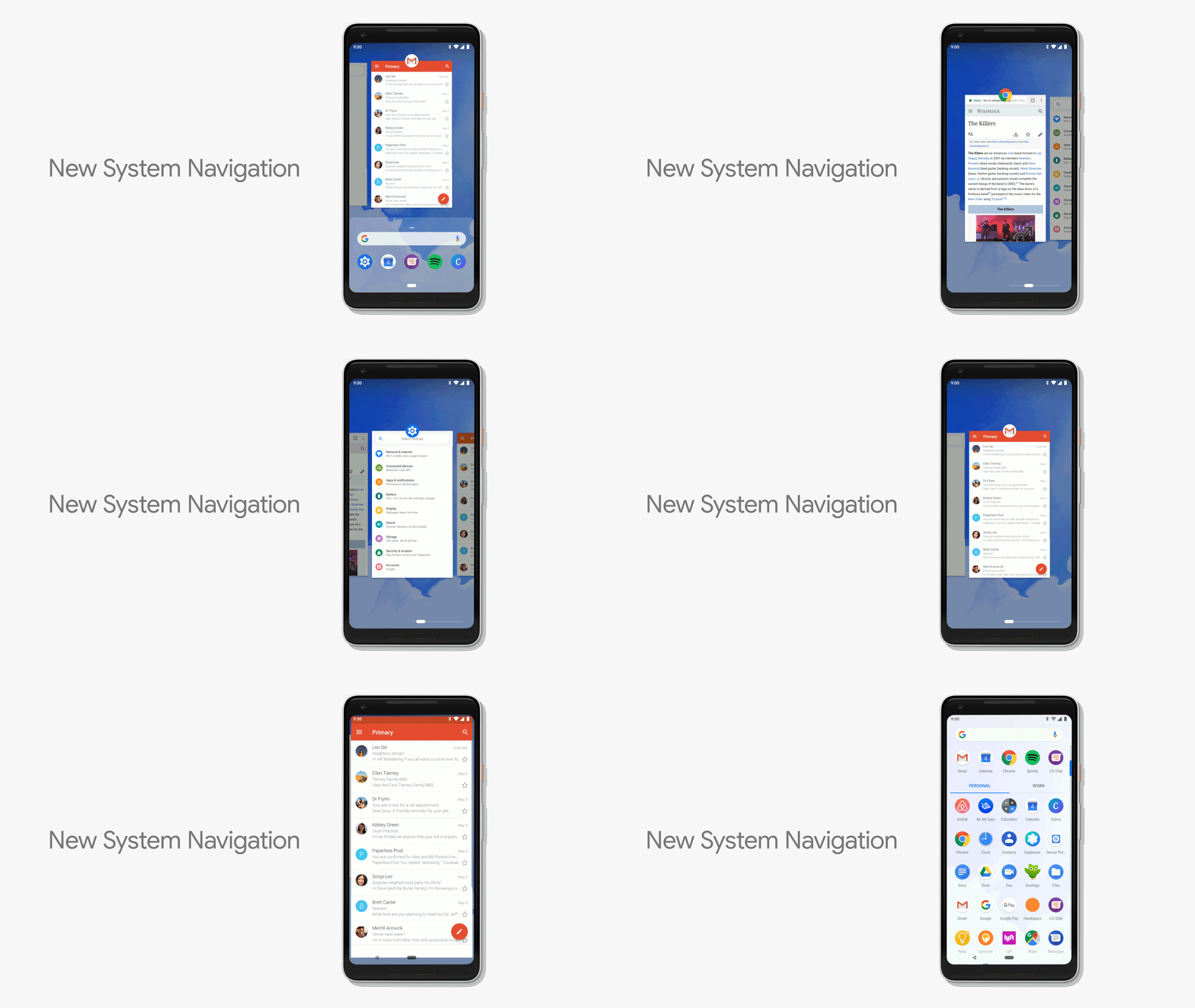
new system navigation
  • Android https://www.blog.google/products/android/android-p/
    • open, most popular OS in world
    • choice, innovation
    • 10 years old
    • smarter operating system
    • battery life is top concern for users
      • Android P - adaptive battery - uses on device machine learning to adapt to your usage patterns to only run certain apps, backup processes on smaller core, and save battery.
      • auto brightness based on current lighting conditions, but now take personal preferences and environment - adaptive brightness, learns your preference and does it automatically for you
    • App Actions - most used apps, predicted by AI, and actions you might take based on your usage. Connect headphones and it brings up music apps
    • Slices - new API to develop interactive snippets of an app in different places in the OS, like in search. https://www.engadget.com/2018/05/08/google-android-p-actions-slices-predictive-apps/
    • evolve Android UI
    • simplicity
    • easier to do things
    • new system navigation
    • easier multi tasking
    • single clean home button and gestures
    • swipe up to overview, predicted apps
    • 2nd swipe up to all apps
    • swipe up anywhere
    • slide home button sideways to scroll through recent apps
    • back button shows up as needed
    • smart text selection and actions
    • volume control - simplified volume slider - default is media volume
    • rotation - lock rotation - unlock rotation button shows up when you rotate phone instead of auto rotate
    • better screenshots
    • better notification management https://techcrunch.com/2018/05/08/android-rolls-out-a-suite-of-time-management-controls-to-promote-more-healthy-app-usage/
    • lessen distractions
    • disconnect, balance life and technology
    • understand your habits - dashboard on how you are spending your time on device
    • meaningful engagement
    • Do Not Disturb mode - block visual notifications. 
    • Shush - turn your phone over on the table and it automatically goes to DND
    • Starred Contacts - allow them in even if DND is turned on.
    • Wind Down mode - tell GA when you want to go to bed - when that time arrives, it turns on DND and then gray theme screen to help you wind down and go to sleep.
    • 100's of improvements in Android P, including Security
    • Android P Beta - available on Pixel and 7 flagship devices, today
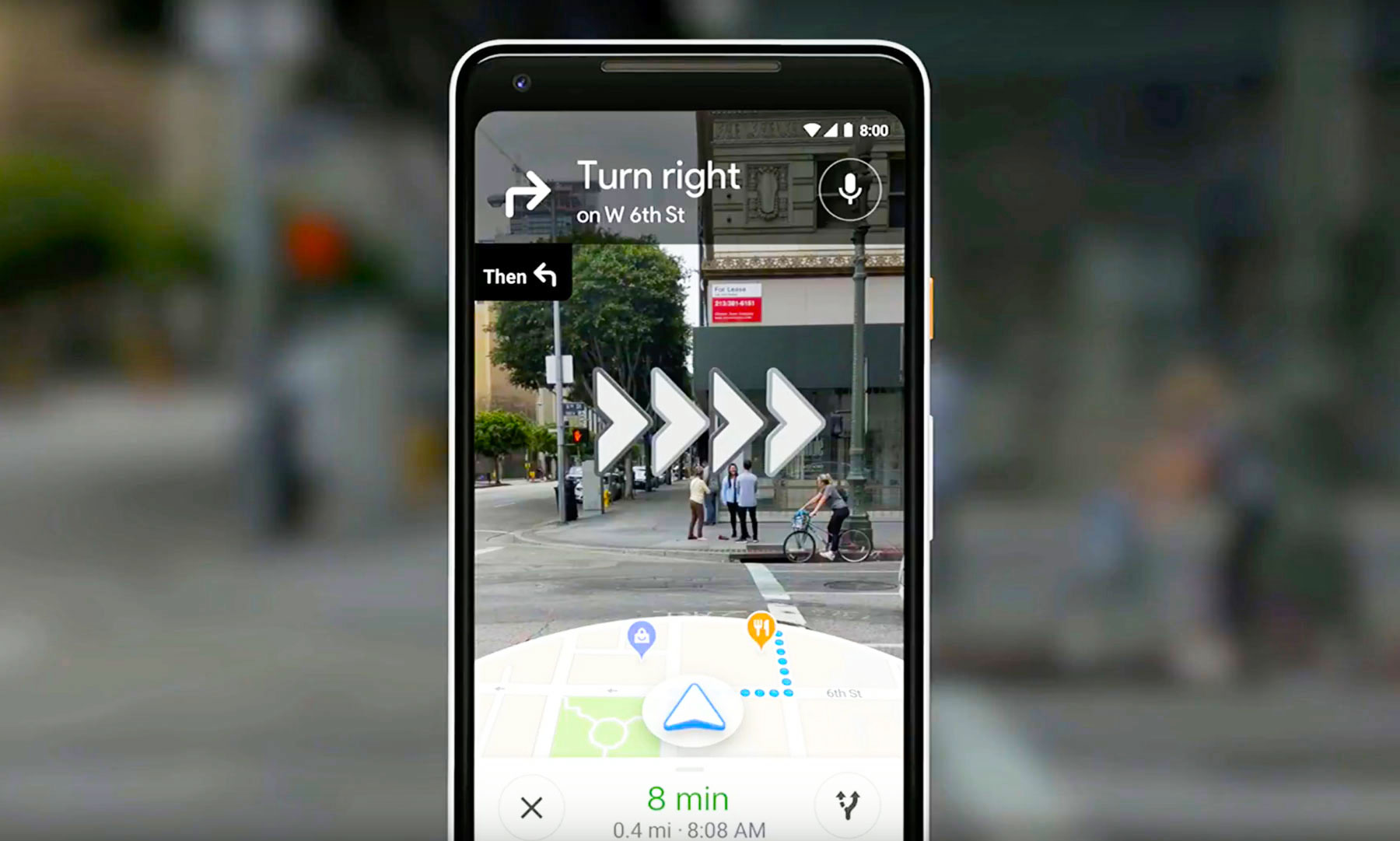
  • Maps https://www.blog.google/products/maps/explore-around-town-google-maps/
    • using AI to expand Maps
    • over 220 countries are mapped
    • 1B+ users
    • smarter and more detailed
    • automatically add new businesses and buildings from street view and satellite
    • business hours, wait time, etc
    • parking info
    • different routes based on mode of transport
    • more accurate traffic predictions
    • get more done
    • what's happening around you
    • uses your info and interests to find things you care about
    • new tab - For You - new things near you, trending info, activities, places and more
    • Your Match - score based on other things you liked to show you how something matches to your likes
    • Planning with others - pick a place together - long press on a place to add it to a short list - share the list with friends to get their preferences and they can vote or add their own places. 
    • Helping Small Businesses get discovered
    • daily posts on events or offers from favorite places
    • mapping the world (15 years old)
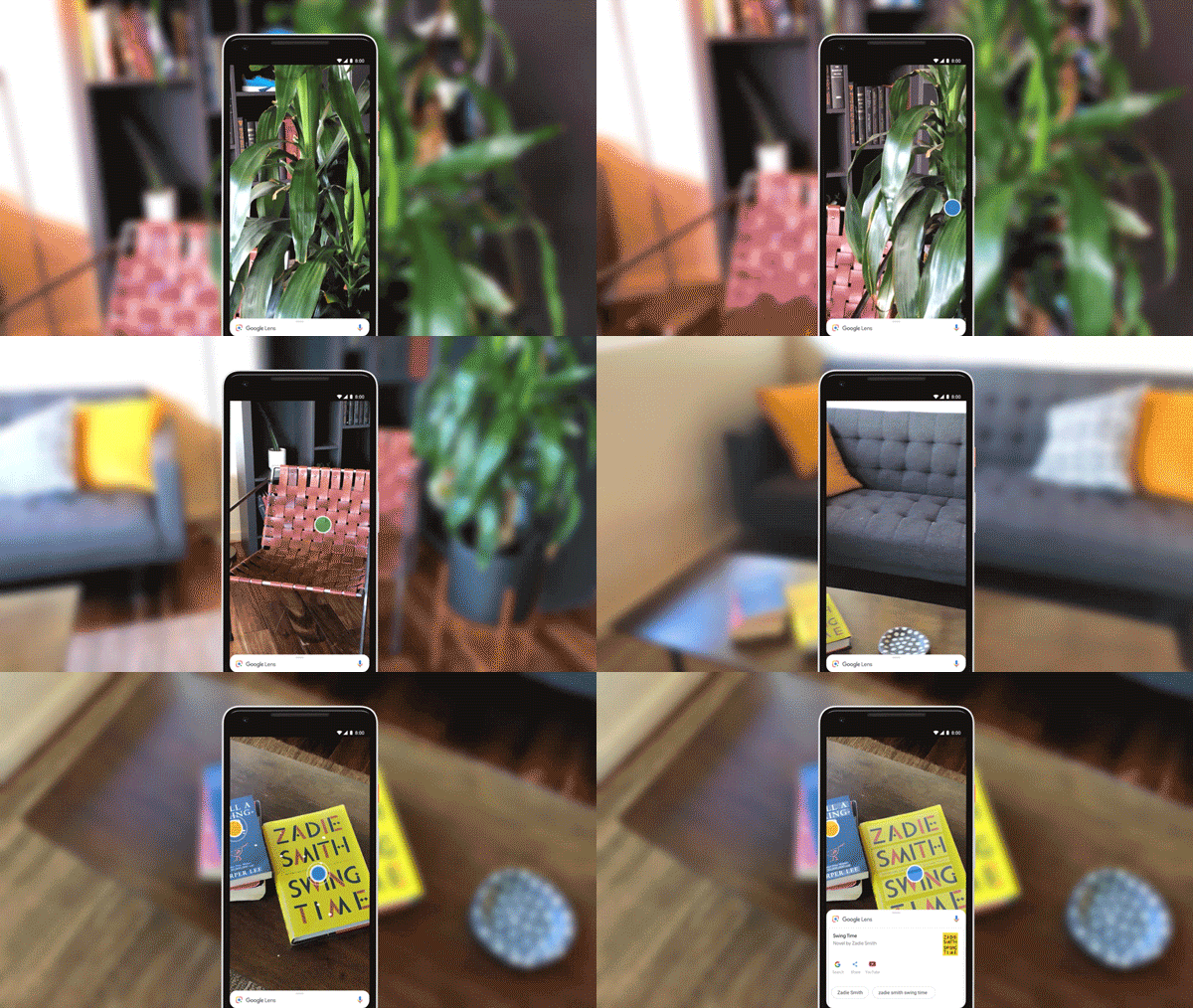
lens_multielements_050718 (1).gif
  • Camera in smartphones https://www.blog.google/products/google-vr/google-lens-real-time-answers-questions-about-world-around-you/
    • AI and computer vision
    • use camera to answer questions - where am I going, what's that in front of me?
    • use camera and street view and maps to reinvision walking navigation
    • Maps info over laid on camera view!
    • which way, places near by, a guide
    • VPS - visual positioning system - based on what camera sees - visual landmarks but more accurate. 
    • Google Lens
    • get info based on what camera sees 
    • available in GA and G Photos
    • and going right into Camera App on Pixel and flagship devices
    • 3 new features
    • Smart Text Selection
      • Recognize and understand words 
      • Copy and paste from camera to app - real words on page, sign, etc. 
      • select a word on a menu and it will show you what it is
    • Style Match 
      • what are things like this thing?
      • open camera, tap on item and get info and other things that match style
    • Real Time Results
      • open camera and Lens starts working instantly to get info for you
      • on device and cloud TPUs to power this
  • Self Driving Cars - Waymo https://waymo.com/
    • part of Alphabet
    • fleet of fully self driving cars on public roads
    • people are already trying it out in Phoenix
      • Waymo early rider program
    • 100x reliability and safety
    • AI - perception and detection
      • finding objects and pedestrians and then avoiding them
      • adapting to things like a car going fast even though red light is coming up
      • adapting to weather like snow
      • safer than human drivers

Amazing things coming!!!
So cool it feels like Science Fiction!

Image result for science fiction


---

Tuesday, May 8, 2018

Free Webinar - Alan November on Teaching Critical Thinking and Web Literacy


International education advocate Alan November will be holding a webinar
titled “Teaching Critical Thinking and Web Literacy: Why Teachers are
More Important Than Ever” on May 22. Alan has been saying for years that
for years that these are areas that need attention, so I'm inviting
everyone to attend!

Webinar attendees will learn about the role critical thinking plays in
web literacy and methods for teaching students to become astute
consumers of media. Various aspects of media literacy will be discussed
along with strategies for developing skills and competencies in those
areas. Alan will also share strategies and resources for weaving
critical thinking and web literacy skills into everyday instruction and
guiding students toward becoming responsible consumers and creators of
web and social media content.

Alan November is an international leader in education technology and was named one of the USA's fifteen most influential thinkers of the decade by Tech and Learning magazine. Alan's most recent book, Who Owns the Learning? made the education New York Times bestseller list. Alan has worked with schools and universities in 40 countries to improve learning through innovative practice. He leads the globally acclaimed Building Learning Communities conference.

If you're interested, you can register for the webinar at

https://bit.ly/2HNccix


Related:

Important Skills Students Need for the Future

New Training Courses from Google - DigCit and Accessibility
Resources on 21st Century Skills

Digital Literacy Resources


-

Monday, April 30, 2018

EdTech Magazine's Must Read K-12 EdTech IT Blogs


EdTech, Focus on K12, magazine has announced their 2018 edition of the 50 Must Read K-12 IT Blogs. There are some great blogs on here that I follow (including my own) and some new ones that I didn't know about that look really great.

Take a look and check them out.


The site is an awesome free resource itself with articles, interviews and videos about Edtech.


The 2018 Honor Roll: EdTech’s Must-Read K-12 IT Blogs
We scoured the web to find some of the best, brightest and most useful blogs across the modern education ecosystem. https://edtechmagazine.com/k12/article/2018/04/The-2018-Honor-Roll-EdTechs-Must-Read-K-12-IT-Blogs


-

Tuesday, April 17, 2018

Google Expeditions - virtual reality to explore the world - resources and instructions


Google Expeditions is a virtual reality teaching tool that lets you lead or join immersive virtual trips all over the world — get up close with historical landmarks, dive underwater with sharks, even visit outer space!

Built for the classroom and small group use, Google Expeditions allows a teacher acting as a “guide” to lead classroom-sized groups of “explorers” through collections of 360° and 3D images while pointing out interesting sights along the way.

There are over 500 expeditions available with more being developed all the time, and you can even sign up make your own! Students can explore the Great Barrier Reef, International Space Station, Mars, major museums and almost anywhere on our planet.

Here are some basic setup instructions. You can buy kits from EdTech resellers.


Basic Setup Instructions:

Power on Teacher Tablet

Sign in with a G Suite for Education account that was set up for the device (recommend not using personal or teacher account for this. Ask your Google Admin to setup a new account just for this purpose)
Get the App - it can be pushed out by the Google Admin, or you can go the Play Store and install it yourself. https://support.google.com/edu/expeditions/answer/7374369


Make sure the student devices have the Expeditions app as well

Click on the Expeditions App and select “Lead” https://support.google.com/edu/expeditions/answer/6335098


Select lessons to download https://support.google.com/edu/expeditions/answer/7271183

Power up and setup Router - make sure all devices are connected to it

On the Teacher tablet, click on the Expeditions app and tap the Play button on the expedition you would like to sent to the student devices https://support.google.com/edu/expeditions/answer/6335098

The students should have the device on and opened to the Expeditions app.

Put the student device in the viewer

And you are off on a wild adventure

Tuesday, April 3, 2018

New tablets for Education - comparing the new Acer Chromebook Tab 10 and the new Apple iPad


Last week had two interesting announcements for EDU - a new iPad and the Acer Chromebook Tab 10 tablet. There have been a lot of different reactions from the two, but most reactions were very positive towards the Chromebook Tab and very "meh" to the new iPad. Here are my thoughts and some articles that were posted about them.

I've used iPads and Chromebooks, as well as managing them in the education space. I've been using a Chromebook Tab 10 for over a week now and here are my thoughts and comparisons:


  1. Management and Deployment - Apple still hasn't gotten this right. Chromebooks, including the new Tab 10, are the easiest devices to deploy and manage. iPads are not easy and require 3rd party tools. This means less headaches, work and cost for school IT departments. 
  2. Price - $329 for the Tab 10 includes the stylus, which docks into the tablet and does not need charging. The $299 iPad doesn't include the stylus and there is no where to dock it. In addition, the Apple Pencil (and Crayon stylus) require charging. With the Apple Pencil, the iPad is now $388 ($348 with crayon stylus). 
  3. Specs - display is the same, Tab 10 has 4GB of RAM and iPad only has 2GB; Tab 10 has a microSD card slot, nothing for iPad; processors are both hi end and optimized for their platforms; both have 32GB onboard storage; Tab 10, and G Suite, have unlimited G Drive storage, iPad comes with 200GB of iCloud storage; similar battery life and dimensions; similar cameras and sensors.
  4. Stylus - similar performance and latency, but Tab 10 includes a garaged stylus, while Apple Pencil is extra ($89) and not garaged. 
  5. Apps
    1. Chromebook Tab 10 has G Suite, Chrome Apps and Android apps, as well as a full desktop browser for true web surfing (and still supports Flash)
    2. iPad - iOS apps and a mobile browser

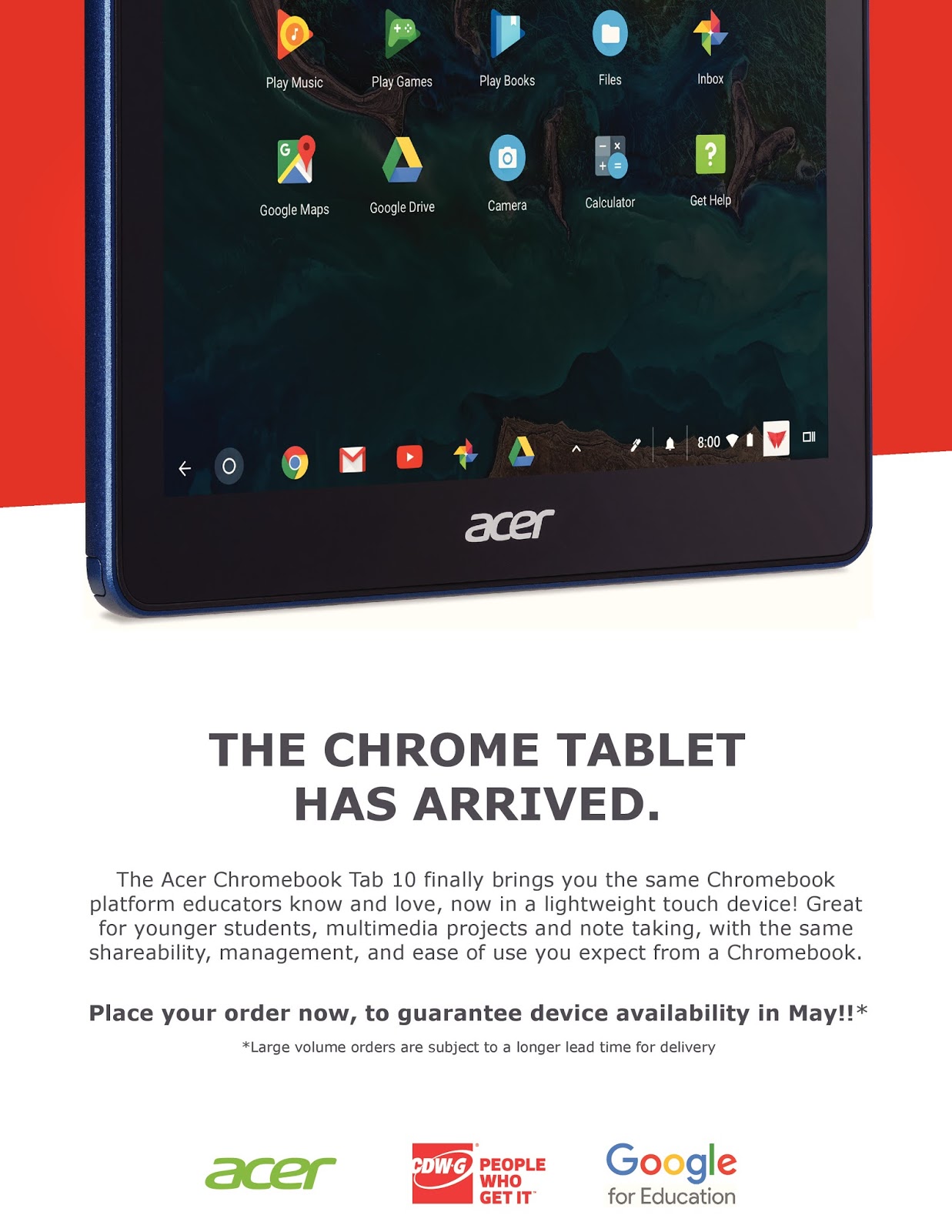
Acer Chromebook Tab 10 D651N - overview design - Large


And don't forget that Professional Development and well designed curriculum and lessons are the really important thing.


The Acer Chromebook Tab 10 is easier to deploy and manage, less expensive with a stylus, and can do pretty much anything.


..

Airtame - wireless streaming with enterprise level controls

Airtame dongle

Airtame is an HDMI device that plugs into a display or projector and allows you to wirelessly display to that device. You can share your screen from any device, on any platform. It includes full screen mirroring on Mac, iOS (Airplay), Windows, Chrome and Linux. They are partnered with many other companies, including Google, Trello, Zoho and more to setup dashboards.

It is very easy to use, but also provides enterprise controls and analytics from a cloud dashboard, providing better security and control than similar consumer devices.

Cloud interface


Some of the things that make Airtame different than other solutions:
https://airtame.com/compare
  • Cross platform access. With Airtame full screen mirroring is possible from all major platforms. It is compatible with devices running Windows, MacOS, Linux, Chrome OS, or even iOS and Android devices.
  • The Cloud platform adds the unique value to the product among other similar products, on the market. With Airtame Cloud you can manage all your Airtames from the Cloud.
  • True screen mirroring. Compared to different solutions it provides full screen mirroring, instead of streaming singular content to a bigger screen. 
  • You can share one computer screen to multiple Airtames. This is a perfect solution especially for large auditoriums or meeting rooms using more than one display screen.
  • There is also a digital signage solution for when an Airtame is not in use. You have an option to set a dashboard, website, slideshow, or custom image. You decide what’s displayed when you’re not streaming.
  • There also have an option of Pin Code Connect, type in a 4-digit pin code to start a stream. This way users from another room can’t interrupt your stream and you won’t stream to the wrong screen by accident.
For more information or to setup a demo:


.

CK-12 Certified Educator Program is back! Great program from a great resource

CK-12 is one of my favorite resources for educators. They have digital, interactive textbooks, practice assessments, simulations, virtual labs, study aids, concept maps, adaptive practice and more, for almost every subject and grade level. And it's all free! And works on all platforms. 

They recently announced that they have brought back their CK-12 Certified Educator Program, which is also free. 

This program helps you learn how you can utilize CK-12 to help you personalize learning, engage students, assign work, and track progress. It also gives you a deeper understanding of all of the resources CK-12 has to offer and how you can customize the content to meet the needs of your students.


CK-12's Certified Educator Program will take place during July 2018, with a variety of live sessions offered multiple times a day between July 9 and July 20.

The live sessions will teach you about all of CK-12's resources to get you prepared for the upcoming school year. Register today and they will send you more information about the program in the coming weeks.


Take a look and see how CK-12 can help you help your students. 


Related:

More about CK-12 and their excellent resources


.

Tuesday, March 27, 2018

Android Apps for Education - work on Chromebooks and Chrome OS Tablets too!


Android Apps for Education 


Android is the most popular mobile operating system in the world, running on smartphones and tablets. But, you can also use Android Apps on Chromebooks, including the new Chromebook Tab 10 Chrome OS tablet. Chrome and Android all in one! And don't forget about all of the Chrome Apps, Extensions and full websites Chromebooks and the Chromebook Tab can access.


Finding good apps can be hard, so here is a list of Android apps for Education to use on Chromebooks, Chromebook Tab and other Android devices.


Explore these apps and try them out in your schools. 


.

Monday, March 26, 2018

Acer Chromebook Tab 10 - the first Chrome OS tablet is here, and it's great!


Acer and Google have just announced the first Chrome OS tablet, the Acer Chromebook Tab 10. Works and managed like a Chromebook, but in tablet form.

This is a great device for schools looking for a tablet device, with a stylus and Android apps, that is easy to deploy and manage. It uses the same management license as Chromebooks and is managed in the same way. It also has a full desktop browser, removing the limitations of mobile browsers.


It is mobile, lightweight, touch and easy to use. Using Chrome OS makes it easy to deploy, manage and share with others. It has dual cameras, an integrated EMR active stylus, multimedia features, note taking and handwriting apps, educational apps (Chrome and Android) for K-3, STEM, video, multimedia and accessibility apps and features. It has a textured surface, similar to the Acer C738T, making it easier to carry, and less likely to be dropped.

Performance is fast and smooth, handling over 15 tabs and 5 apps during my testing time and the stylus is amazing, with no noticeable lag, allowing me to take handwritten notes effortlessly, as well as annotate items.

  • First tablet running Chrome OS designed for education, promoting engagement and collaboration. 
  • Chrome Education License support allows central and remote management of a large number of devices. 
  • Included Wacom® EMR stylus pen for natural writing and drawing. 
  • Stylus is battery-free, slips into a handy dock on the tablet and replicates the usage, accuracy and size of an ordinary pen. 
  • Planned support for Google Expeditions AR (augmented reality) to enable immersive learning experiences. 
  • Full Google Play support, giving teachers and students access to educational Android apps curated by administrators. 
  • All-day productivity with up to 9 hours of power from the lithium-polymer battery.

Specs:
  • MSRP: $320 available in April in US.
  • Operating system Chrome OS with Android support through Google Play
  • Display 9.7-inch QXGA backlit LED, 2048x1536
  • Processor OP1 platform
  • Storage 32GB eMMC
  • Expandable microSD
  • RAM 4GB
  • Rear camera 5 MP
  • Front camera 2 MP
  • Connectivity 2x2 MIMO 802.11ac Wi-Fi
  • Bluetooth 4.1
  • Ports USB 3.1 Type-C
  • Combo headphone/microphone jack
  • Battery 34 Wh (Up to 9 hours)
  • Stylus Wacom EMR (included) With onboard housing
  • Software Support for Chrome Educational licensing
  • Planned support for Google Expeditions AR
  • Dimensions 172 x 238.8 x 9.98 mm 
  • 550 g
  • Colors Cobalt Blue

Related:

Monday, March 19, 2018

New Training Courses from Google - DigCit and Accessibility

google for education logo

Google has some great resources for educators at the Google for Education Training Center. Included are courses on Chromebooks, becoming a Trainer, and Fundamentals and Advanced training for using G Suite in the classroom.

They recently added two new courses that are very relevant to educators. Like the other courses, they are easy to use and excellent materials.

The Digital Citizenship and Safety Course helps teachers learn how to help their students stay safe online and become responsible digital citizens.

The Tools for Diverse Learners Training helps teachers learn how to use the accessibility features in Chromebooks and G Suite to help their students succeed.

Take a look at these two new courses, as well as the rest of the training center, and see how they can help you help your students.


Related:

Google for Education Resources 


Monday, February 5, 2018

The Big Guide to STEM - free guide with resources from educators


"The Big Guide to STEM" is a free e-book containing resources and STEM ideas from educators on integrating STEM/STEAM into the classroom.

It also contains a collection of top 10 STEM lists:

* Top 10 STEM apps
* Top 10 STEM tech products
* Top 10 STEM blogs and online communities
* Top 10 STEM websites
* Top 10 STEM events
* Top 10 STEM Software Solutions
* Top 10 Resources for STEM Funding
* Top 10 STEM Resources for Girls

This is a great resource for any teacher at all, but especially those working with STEM courses or projects.

http://news.mimio.boxlight.com/stem-guide


Although it's published by Boxlight, the only company info is in the
logos. Sunshine Nance, Boxlight’s VP of Marketing, has made it her
mission to facilitate STEM education, including helping to organize the
Georgia Girls STEM Collaborative and working with the STEM Atlanta Women
group. So, this guide is part of a heartfelt mission for her.


Related:

STEM Resources 


.


Vernier Software & Technology Launches Go Direct Sensor Cart


Vernier Software & Technology Launches Go Direct Sensor Cart


Vernier Software & Technology recently launched the new Go Direct® Sensor Cart for middle school, high school, and college physics students. The wireless dynamics cart allows students to easily explore force, position, velocity, and acceleration using Bluetooth® wireless technology.

This is a great way for students to explore and gain an understanding of kinematics and dynamics.

Product image for Go Direct® Sensor Cart


www.vernier.com/gdx-cart


Related:


.

Monday, November 13, 2017

Virtual Reality Apps for Education


Virtual Reality (VR) is one of the newer technologies moving into the classroom. Google Cardboard and Google Expeditions are the two most popular, but here are some more great VR apps for education:

(these are links to the Google Play store, but they all have iOS versions also)

Cardboard
(free)
Cardboard puts virtual reality on your smartphone. The Cardboard app helps you launch your favorite VR experiences, discover new apps, and set up a viewer.

Try out a set of included demos as well


• Earth: Fly where your fancy takes you on Google Earth.
• Tour Guide: Visit Versailles with a local guide.
• My Videos: Watch your videos on a massive screen.
• Exhibit: Examine cultural artifacts from every angle.
• Photo Sphere: Look around the photo spheres you've captured.
• Arctic Journey: Fly alongside Arctic terns, create your own flower garden, relax under the northern lights and more.


Expeditions

(free)
Google Expeditions is a virtual reality teaching tool that lets you lead or join immersive virtual trips all over the world — get up close with historical landmarks, dive underwater with sharks, even visit outer space!

Built for the classroom and small group use, Google Expeditions allows a teacher acting as a “guide” to lead classroom-sized groups of “explorers” through collections of 360° and 3D images while pointing out interesting sights along the way.


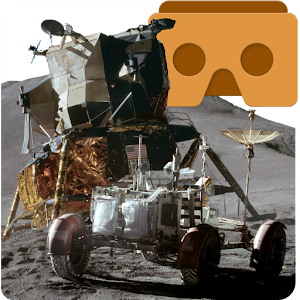
Apollo 15 Moon Landing VR

(Free)
Use your phone and Google Cardboard to simulate the 1971 Apollo 15 Moon Landing.

Feel the rumble as the spacecraft descends to the Lunar surface.
Walk on the moon like Scott and Irvin did, and unpack and drive the Lunar Rover.


Discovery VR for Cardboard

(free)
The Discovery VR app has always been about driving curiosity – exploring new places, characters and ideas. With VR videos, Discovery embraces a new opportunity to tell these amazing stories immersing you in experiences like never before. We’re excited about what virtual reality will show us, and we’ll be adding new content regularly.

Exclusive content from your favorite shows – like Shark Week, Deadliest Catch and MythBusters.
Heart-pounding adventures with incredible thrills – like mountain biking, surfing and, of course, rollercoasters.
Rescue rhinos, swim with elephants and bask in the beauty of majestic tigers.
From Samurai sword fights in Japan to dancing in the pubs of Dublin, come with us to explore the globe


Google Street View
(free)
Explore world landmarks, discover natural wonders, and step inside locations such as museums, arenas, restaurants, and small businesses with Google Street View.

Google Arts & Culture VR

(free)
View artworks curated by museums from around the world with the Google Arts & Culture VR app. Step inside a virtual gallery to see works by artists like Van Gogh or Rembrandt. You can zoom in to see every brushstroke, and hear audio guides from expert museum curators.

The Google Arts & Culture VR app requires a Daydream-ready headset such as Daydream View and a Daydream-ready phone such as Pixel. Learn more at http://g.co/daydream.


YouTube VR
(free)
Experience every YouTube channel, video and creator in virtual reality.

The YouTube VR app turns every video on the platform into your own virtual reality experience and reimagines YouTube as a 3D world you can explore from the inside. Available first on Daydream View.

Experience YouTube like never before
• Step inside YouTube and explore the site in 3D VR setting
• Watch and browse every video on YouTube, from 3D 360 videos to standard rectangular videos
• Get a full, signed-in experience that lets you view subscriptions, playlists, watch history, and more.


RESOURCES:

Google Expeditions Support site: https://support.google.com/edu/expeditions#topic=6334250 
Expeditions Site: https://edu.google.com/expeditions/


20 TOP VIRTUAL REALITY APPS THAT ARE CHANGING EDUCATION

At both the primary and secondary level, augmented reality has the power to provide students with more interactive experiences.

Immersive Technology in Schools Is on the Rise
Virtual and augmented reality tools bring new experiences to students.

Real Uses of Virtual Reality in Education: How Schools are Using VR.

VR kits for schools available from edtech resellers like CDWG. 


.

Our Blog

55 Cups
Average weekly coffee drank
9000 Lines
Average weekly lines of code
400 Customers
Average yearly happy clients

Our Team

Tim Malkovic
CEO
David Bell
Creative Designer
Eve Stinger
Sales Manager
Will Peters
Developer

Contact

Talk to us

Lorem ipsum dolor sit amet, consectetur adipisicing elit. Dolores iusto fugit esse soluta quae debitis quibusdam harum voluptatem, maxime, aliquam sequi. Tempora ipsum magni unde velit corporis fuga, necessitatibus blanditiis.

Address:

9983 City name, Street name, 232 Apartment C

Work Time:

Monday - Friday from 9am to 5pm

Phone:

595 12 34 567