We Are Creative Design Agency

Lorem ipsum dolor sit amet, consectetur adipisicing elit. Illum, fuga, consectetur sequi consequuntur nisi placeat ullam maiores perferendis. Quod, nihil reiciendis saepe optio libero minus et beatae ipsam reprehenderit sequi.

Find Out More Purchase Theme

Our Services

Lovely Design

Lorem ipsum dolor sit amet, consectetur adipiscing elit. Praesent feugiat tellus eget libero pretium, sollicitudin feugiat libero.

Read More

Great Concept

Lorem ipsum dolor sit amet, consectetur adipiscing elit. Praesent feugiat tellus eget libero pretium, sollicitudin feugiat libero.

Read More

Development

Lorem ipsum dolor sit amet, consectetur adipiscing elit. Praesent feugiat tellus eget libero pretium, sollicitudin feugiat libero.

Read More

User Friendly

Lorem ipsum dolor sit amet, consectetur adipiscing elit. Praesent feugiat tellus eget libero pretium, sollicitudin feugiat libero.

Read More

Recent Work

Thursday, September 29, 2016

Free Back to School Guide for students - scheduling, budget, study habits and more


This Back to School Guide, is a free resource for helping students achieve greater success in school. The new guide offers tips for efficient scheduling, how to maintain a budget, creating good study habits and more using office productivity software.
The guide is available here for download: http://blog.wps.com/2016/09/26/pdf-back-to-school-guide/.


The guide includes these topics:
• Back-to-School Basics: Tracking Tools Can Help You Prepare for Fall
• Getting Back in the School Mindset
• Templates, Style Trends, and More
• Good Study Habits and Why They Help Students
• The Importance of Scheduling for Students
• Additional Resources for Students
• Helping Students Start Thinking Ahead to College
• Summer Assignments to Prepare for the Next Year Ahead


To download the full Back to School Guide, visit https://goo.gl/UO4rBr.


Other resources for students:

10 Great, Free Apps for Students for Notetaking and Class Planning

Successful Studying Tips and Resources for Students

Study Tips and Notetaking Resources

Resources on How to Study

Study Aids

Important Skills Students Need for the Future that we need to help them learn

10 Important Skills Students need for the Future

10 Technology Skills Every Student Needs for the Future

Project wirelessly from your Chromebook to Epson projectors with iProjection App


Epson announced the availability of the Epson iProjection™ App for Chromebooks, enabling students and teachers to wirelessly display content from Chromebooks on Epson BrightLink® interactive projectors and most PowerLite® projectors. With the Epson Multi-PC Projection with Moderator function1 and the Epson iProjection App for Chromebooks, the teacher has the ability to display up to four Chromebook notebook computers simultaneously from a maximum of 50 connected devices for an engaging collaborative classroom experience.


This is a huge feature that many teachers have been asking for. Imaging being able to move around the classroom, projecting from your Chromebook, or having your students share their work with the class, all wirelessly!


I wish I had this when I was a teacher!


More info below:


LONG BEACH, Calif. – Sept. 27, 2016 – Epson, the number-one selling projector brand worldwide, today announced the availability of the Epson iProjection™ App for Chromebooks, enabling students and teachers to wirelessly display content from Chromebooks on Epson BrightLink® interactive projectors and most PowerLite® projectors. With the Epson Multi-PC Projection with Moderator function1 and the Epson iProjection App for Chromebooks, the teacher has the ability to display up to four Chromebook notebook computers simultaneously from a maximum of 50 connected devices for an engaging collaborative classroom experience.

“Chromebooks are now the device of choice in the classroom and we worked directly with educators to ensure our app was meeting their needs for classroom collaboration,” said Jason Meyer, senior product manager, Epson America. “With the app, we developed a way to wirelessly mirror Chromebooks on Epson projectors so that it supports multiple Chromebook displays at the same time.”

For teachers and students, the Epson iProjection App for Chromebooks makes it easy to move about the room and effortlessly share content with the entire class by wirelessly sharing Chromebooks with the classroom projector. When used on its own, the Epson iProjection App for Chromebooks can display content from a single Chromebook on an Epson projector. When the app is used in conjunction with the Epson Multi-PC Projection with Moderator function, teachers can select and display content from up to four Chromebooks at one time.

Epson projectors expand the educational capabilities of flat surfaces, transforming any 2D surface, such as a whiteboard, into an educational work space. Epson 3LCD projectors deliver three times brighter colors than leading competitive projectors to deliver amazing, true-to-life color and detail for powerful, educational lessons2. With genuine Epson lamps  lasting up to an estimated 10,000 hours depending on the projector model3, educators can engage students in seemingly endless learning opportunities by projecting directly from a variety of devices utilizing advanced connectivity options while supporting easy readability for everyone in the room.

About the Epson iProjection App
Leveraging the free Epson iProjection app, teachers can wirelessly display documents, photos and web pages from Chromebooks and most iOS Apple devices running iOS 4.2 or later, including the iPad®, iPhone® and iPod touch®, and most AndroidTM devices running Android 2.3 or later.

About the Epson Multi-PC Projection with Moderator function
Multi-PC projection with Moderator function is a free software program from Epson enabling teachers to wirelessly connect up to 50 devices and share students' work from up to four device screens simultaneously, including computers and Chromebooks and iOS® and Android™ tablets and phones.

About Epson Education Products
Designed with educator input, Epson’s advanced interactive display and projector technologies make bright, collaborative learning environments a reality. Compatible with a wide range of devices and widely-used interactive software, Epson projectors make it easy for teachers to share content and engage students, no matter where they sit in the classroom. Epson’s unmatched technology, service and support ensures that educators have high quality, bright images and multimedia available in the classroom every day.

About Epson BrightLink Projectors
Epson’s award-winning line of BrightLink interactive projectors offers advanced connectivity options to project onto any existing whiteboard, wall or other smooth, light-colored, hard surface. BrightLink interactive projectors offer dual pen support and PC-free annotation with a range of devices including document cameras, DVD and Blu-ray players as well as tablets and mobile devices, or no source at all. The cost-effective BrightLink models deliver a large interactive learning area with variable image sizes and include HDMI connectivity. Epson BrightLink projectors utilize 3LCD, 3-chip technology for brilliant images with vivid color.

About Epson PowerLite Projectors
Epson’s extensive line of affordable short-throw and ultra short-throw projectors provide a reliable design for the connected K-12 classroom that minimizes glare and shadow interference to deliver brightness and resolution options to accommodate a diverse range of educational needs. With models that offer moderator functionality that allows a network of up to 50 personal devices to connect to the projectors, teachers can wirelessly control which personal devices are displayed, with up to four student screens shown simultaneously1. In addition, many projectors feature two HDMI ports, one with MHL (Mobile High-Definition Link) support for connecting multiple digital devices, including mobile phones, tablets and other portable devices, for enriched high definition viewing capabilities.


-

Tuesday, September 20, 2016

Mojo Networks Introduces Mojo Enforce for the K-12 Education Marketplace and Chromebooks


Mojo Networks Introduces Mojo Enforce for the K-12 Education Marketplace

Mojo Enforce is the First Cloud Managed WiFi Feature to Integrate Directly Into Google for Education to Automatically Enact Policies on the School’s WiFi Network

This is a great option for schools to control access to their wireless networks and works with Chromebooks.


Mountain View, CA, September 7, 2016 – Many K-12 schools and districts have challenges in controlling what devices connect to their WiFi networks because of the limitations of current WiFi authentication techniques. With the continued growth of connected devices – iPads, Chromebooks, smartphones and tablets and more – in schools, there is a growing need for school IT administrators to control WiFi device connections.

Mojo Networks, a leader in secure cloud managed WiFi for the K-12 educational market, announces Mojo Enforce. Enforce takes policies for network access and device management from third party systems and applies them to the WiFi network; the first integration for Enforce is with Google for Education. With Enforce, Mojo is the first cloud managed WiFi to integrate with Google for Education to ensure that only devices registered in the school’s Google domain are able to connect to the school WiFi network and enforce network access policies. This unique integration, coupled with Mojo Network’s robust cloud managed WiFi solution and high-performing access points, brings even more control, usability and ease-of-use to school districts.

According to data from Google, more than 50 million students, teachers and administrators around the world rely on Google for Education to learn and work together. Managing the WiFi credentials for those 50-plus million and growing individuals is handled by the network administrator, but is not easily integrated.

Currently, schools use two primary methods to authenticate devices on WiFi networks: PSK (Personal Shared Key) or 802.1x (the standard for post-based Network Access Control). But both have their limitations. PSK is easy to deploy but the passphrase is too easily shared with no real limitations, and 802.1x is costly as it typically requires on-premises appliances (AAA and User Directory). In the case of Google for Education schools, there is a need to create a local copy of the user database from Google Apps.

With both techniques, there is no real way for school network administrators to control which devices can connect to the network. Allowing unauthorized devices creates performance issues with too many devices; gives no visibility or control; and, creates IT management headaches. Mojo’s integration with Google adds an additional layer of authentication above PSK or 802.1x, providing administrators the control to define what devices connect to the network. Enforce is easy to setup with no additional licenses or on-prem appliances; it works on top of the existing school Mojo WiFi network without the need for any client or network re-configuration.

“It’s great to see a WiFi infrastructure vendor like Mojo Networks develop a direct integration with Google for Education that solves a real challenge people in my position face daily,” said Vernon Young, Director of Information Technology at Oakland Catholic High School. “With this integration, I have real control over who connects to our network and am able to ensure secure access for every student and teacher throughout our high school.”

“Mojo Networks looks to automate WiFi management for all our customers, whether it’s the large enterprise, higher education or K-12 school districts,” said Sriram Venkiteswaran, Director Product Management at Mojo Networks. “We look at technology and WiFi – and specifically the tools, automation and pricing of Mojo – as an enabler of education. With Mojo Enforce, we free up time for the network administrator, and secure WiFi for students and teachers alike with a low-cost, simple and functional process.”

How Mojo Enforce Works

Mojo Cloud fetches the enrolled devices (Chromebooks, iPads, etc.) from the school’s or district’s Google for Education account

Mojo Cloud pushes out the allowed device list to all Mojo cloud managed access points

The devices connect using either PSK or 802.1x authentication

If authorized, access point assign role / network policy based on device OU membership
If unauthorized, the access point denies the connection

With the ease of set-up and use, what was a complicated process and a pain point for school districts has become a non-issue. Mojo cloud managed WiFi coupled with Google for Education brings another level of authentication to schools and highlights the greater value of cloud managed WiFi. Mojo Networks is about making the school IT administrators life easier, with students and teachers easily connecting to WiFi and learning.

Enforce and the integration into Google for Education will be available in Q4 2016, with other integrations coming in 2017. The open beta will begin Q3 2016; to sign up for the beta, please fill out the form at http://mojonetworks.com/google-early-access.


.

5 Great Digital Tools for Teachers


Planning for the first month of school can take on average 16 hours of prep, research, practice and refinement for every one hour of actual teaching time.

In the hopes of giving teachers some hours back this month, here are 5 digital tools that teachers can use to lifehack their course planning.


#1 BRAINSTORM IN THE CLOUD:
Always forgetting great coursework planning ideas you have outside of class? Jot your brainstorms on your phone’s Evernote app. Your ideas will be synced to a central location automatically, so you can have all your great ideas in one place.


#2 HAVE A DIGITAL PROJECT HUB
Are you a visual brainstormer? Trello mimics your wall of Post-Its so you can drag and drop course ideas and to-do’s, big questions or due dates for projects. Teachers can also create projects for students, and ask them to add writing tasks, encouraging classroom collaboration.


#3 TEACH VISUALLY
Course Hero has just launched an Infographic Study Series (coursehero.com/lit/): a collection of over 90 classic literature titles in visual form to help students learn efficiently. These easy to read infographics are the perfect bite-sized summaries to incorporate into your English 101 planning. See more information below.


#4 AMP UP YOUR PRESENTATION
Sick of conventional classroom presentations? Prezi’s zooming canvas opens up the classroom to active learning and interactivity, making lessons understandable, memorable and fun. Prezi also offers a free Edu Pro account.


#5 BE A DIGITAL TASK-MASTER
Wunderlist is a to-do list app that allows you to add tasks, set due dates and reminders, and link out to relevant resources.


Related:

Evernote for Education - great ideas and resources for using Evernote

Wunderlist - free and easy to use task manager

More Resources for Getting Organized and some more!

More Presentation Resources

Resources on Prezi

Top 5 Apps for Educational Administrators to Use

My most used/favorite Apps and how I use them

My Favorite Resources for Teachers and Students


Course Hero is an online learning platform that empowers millions of students and educators to succeed.

Course Hero Introduces Literature Infographics

The company announces first-of-its-kind visual learning collection to help students master literature

REDWOOD CITY, Calif. -- Course Hero, an online learning platform that empowers millions of students and educators to succeed, has developed “Literature Infographics” to help students better understand great works of literature. This visually stunning learning tool includes the key critical literary works that students will need to prepare for the upcoming fall semester. Course Hero developed these unique learning materials to provide students with a visual tool to help understand the key elements of classic literary work.

The series currently includes the following titles:

A Clockwork Orange by Anthony Burgess
Alice in Wonderland by Lewis Carroll
Beloved by Toni Morrison
Beowulf translated by Seamus Heaney
And many more

The Literature Infographics (coursehero.com/lit/), which currently contain more than 90 titles, are a unique way for students to learn about the characters, themes, authors, and literary devices contained in the works many students will be reading this year.

“As an educator, I see these infographics as a fun, visual way to immediately immerse students in the essential ideas, concepts and literary devices that can facilitate their understanding and appreciation of literature,” said Kathi Duffel who has been a teacher for over 30 years and is an AP English and Journalism Advisor at Bear Creek High School (California). Kathi is also the recipient of the 2015 James Madison Freedom of Information Award by the Northern California Society of Professional Journalists.

“We believe our Literature Infographics will help students better understand the complex ideas behind some of these great works of literature by providing a visual, story-driven perspective to the content they are related to ,” said Course Hero Co-founder and CEO Andrew Grauer. “It’s also our hope that educators will find these materials rich, engaging and helpful in addition to the lectures, class notes and other materials that they painstakingly prepare for students in the classroom.”

The Course Hero Literature Infographics are free for students and educators to browse, download, and share with classmates, friends, and colleagues and can be found here.

About Course Hero | Master Your Classes™

Course Hero is an online learning platform that empowers millions of students and educators to succeed. Fueled by a passionate community of students and educators who share their course-specific knowledge and educational resources, Course Hero offers the biggest and best library of study documents, expert tutors, customizable flashcards, and course advice. Course Hero is now used by over 10 million students to supplement their class work with course-specific study materials.


.

Monday, September 19, 2016

Create Quizzes with Learnclick to ask Questions in Context


With www.learnclick.com you can easily create online cloze tests like fill in the blanks, drag & drop and dropdowns as well as traditional multiple choice quizzes. It is an ideal tool for asking questions in context as you can ask your students to fill out the missing words in a text.

Create logins and assign your quizzes to a class in order to track progress. Or share it with anyone and embed the quiz into your homepage for the purpose of practicing. 


Learnclick offers the option to add pictures, sound files and embed youtube videos. Other features that make the life of busy teachers easier are: generating PDF files, import/export questions as well as an export to Excel for given answers. 


Disclaimer - Learnclick is a paid advertiser of Educational Technology Guy.


.

Friday, September 16, 2016

CK-12 Concept Maps - see the connections between math and science concepts


CK-12, one of my all time favorite, free resources for teachers, has a very cool new feature called "Concept Maps".


 "Concept Maps" uses visual concept mapping to show connections between different concepts in math, science and connections between math and science. It is very easy to use and is a great way to help students see these connections, make their own connections, and see why learning these different topics is so important.

Just search for a topic and suggested items appear. Select one and see the concept map. Math and science are color coded so you can tell which is which.


Here is one on Bio and Forensics:


Here is one on Newton's 2nd Law of Motion:


This is an excellent resource for helping students better understand concepts and connections.

Make sure you also check out all of the other great resources CK-12 has to offer.


More great resources on CK-12 and what it has to offer for teachers and students. 
Digital, interactive textbooks, simulations, virtual labs, assessments, games, and much more.


-

Ex Google Play Marketing Chief Hired to Help Students Enter "Workplace of the Future"


Consider this: Bill Gates has poured billions of dollars into what he calls the “future of learning” - and Mark Zuckerberg just announced a new $50M ed-tech investment. Both with a big push towards personalized learning.

Course Hero, now led by a new CMO - former Google Play Marketing chief, Patrick Mork - wants to also bet on students, by democratizing access to study materials: its 12.5M users, to be exact.

By tackling the “The 4 Ls” - crucial problems that students and educators face today - this college student favorite wants to change the way students learn, study, and succeed in the “workplace of the future”.


What are the 4 L’s? It’s lack of:

#1 TIME:
Students today have less time than ever before to master their course material because of more classwork, homework, multiple study groups, extra-curricular activities, and even side jobs to pay their ballooning student bills.

#2 MASTERY:
Students learn the same material at the same pace but are often not mastering the full content, resulting in an unstable foundation.

#3 COLLABORATION:
Collaboration is the absolute norm in the modern workplace, with tools like Slack, Google Docs, Box, and Asana. In fact, the time spent by employees in collaborative activities has ballooned by 50% or more in the past 20 years. Yet, many classrooms are still focused on individualized learning and individual contribution, which may not prepare graduates for the workplace of the future.

#4 PERSONALIZATION:

The sheer number of students per class poses a hard challenge for educators and TA’s in assisting the needs of each student. Educators just can’t personalize if they’re dealing with an over-crowded classroom.

In the last 12 months alone, the platform’s content library has grown over 50%, it has added 170,000 pieces of Course Advice (from virtually zero) and its user base now exceeds 12.5M users.


##########################

Course Hero Graduates: Unveils a Brand refresh and Makes Key Hires to Accelerate White Hot Growth

Hires Google, Yahoo! and VMWare executives as it powers through 145+% user growth

REDWOOD CITY, Calif. Course Hero, an online learning platform that empowers millions of students and educators to succeed, today is announcing major growth metrics, three big name hires hailing from Google, Yahoo!, and VMWare, and a corporate rebrand to better position itself for the hard-to-reach but very important demographics of students and educators.

Course Hero is a crowdsourced learning platform where students and educators share and access millions of course-specific educational resources, get 24/7 online tutoring, and create flashcards. In the last 12 months alone, the platform’s content library has grown over 50%, it has added 170,000 pieces of Course Advice (from virtually zero) and its user base now exceeds 12.5M users.

“I’m incredibly proud of the work the Course Hero team has done to support students and democratize access to course-specific study materials,” said company co-founder and CEO, Andrew Grauer. “I’m also proud of the work we’re doing to support educators as the Course Hero platform now serves more than 85,000 free educator accounts. These accounts enable them to share their own materials with other educators and students and get access to each other’s materials. Our aim is to bring educators together. We want to help them find new inspiration, learn new techniques, and investigate multiple perspectives to learn from each other, save valuable time, and get better learning outcomes for students.”

To continue this trajectory of rapid growth in serving both students and educators, Course Hero has also brought on a slate of top leadership, and is introducing an exciting new brand identity.

To help accelerate this growth and scale the company's marketing and partnerships team, the company recently hired Patrick Mork as its new Chief Marketing Officer. Mork, who led the rebrand initiative, has an impressive career background that includes building and leading the marketing team that launched the Google Play store. He is joined by new VP of Engineering Lynne Thieme, formerly VP of Engineering at Idealist and a member of the Alumni board at University of Illinois Urbana-Champaign. Thieme’s career also includes positions at VMware, Oracle and IBM. Lastly, the company also brought on CFO Stephen Van Horne who was previously CFO at Get Insured and brings years of experience from Yahoo!, Ignite! and Bechtel.

About Course Hero | Master Your ClassesTM

Headquartered in Silicon Valley, Course Hero is a venture-backed online learning platform that empowers millions of students and educators to succeed. Fueled by a passionate community of students and educators who share their course-specific knowledge and educational resources, Course Hero offers the biggest and best library of study documents, expert tutors, customizable flashcards, and course advice. The company was named a Top Workplace by the Bay Area News Group. Download the Course Hero app for iPhone or Android today or follow Course Hero on CrunchBase and AngelList.


--

Friday, September 9, 2016

Microsoft Education Community - great, free resource for teachers

Microsoft


The Microsoft Education Community is a great, free resource for teachers. It has free web courses on using Microsoft tools and on best practices for using technology in education. There are discussion groups, resources and training tools available. You can earn badges and certifications through the site also.


The site is easy to navigate and has some excellent resources. The training goes from the basics of using email, to Office 365 to new products like Sway. It also includes 21st Century Learning, Accessibility and more. Teachers share resources here, as well as providing support and feedback to each other. There are even some great virtual field trips.


Check it out!


Related:

Microsoft Education Resources, including Office 365


.

Remembering 9/11 - 15 years later


I was in EMS for 22 years before retiring due to a back injury. One of my most memorable experiences was responding to New York City as a Paramedic in the aftermath of the terrorist attacks of 9/11. I will never forget that experience. What I saw and did are still with me, as is a type of asthma from breathing the dust. My Experience as a Paramedic on 9-11-01 


As the years have gone by, I've noticed that people are not remembering this terrible event like they did the first few years after. I know that my EMS, Fire and Police colleagues all do, as do the brave men and women of our armed forces who fight every day against terrorism.

I've also noticed less being done in schools lately. Most of today's students weren't even born when 9/11 occurred. Please teach them about it (facts only please) and make sure they understand what it means.


I will never forget that day, my experiences, and the EMS Brothers and Sisters lost on that day:


United We Stood, United We Stand

Today is a day Americans will never forget.
It is a day of remembrance, a day of reflection and a day to be proud.
It is a day we honor and remember the thousands of lives lost, the survivors, and those who rose up in service in response to the attacks on 9-11-2001.
It is a day we pay tribute to and reflect on the sacrifices of the public safety workers and the men and women in our military who serve us and protect us 365 days a year.
It is a day Americans can be proud of the way we came together following the attacks on 9-11.
United We Stood. United We Stand.


Here are some more resources about my experience on 9/11 and 9/11 in general:

My Experience as a Paramedic on 9-11-01

Remembering 9/11 (from 2009)

http://www.history.com/content/9-11/102-minutes

http://makehistory.national911memorial.org/

http://www.national911memorial.org/site/PageServer?pagename=New_Home

http://www.time.com/time/photogallery/0,29307,1921566_1932073,00.html

http://larryferlazzo.edublogs.org/2008/08/13/the-best-sites-to-help-teach-about-911/


-

Wednesday, August 31, 2016

Six Sigma in Education - applying quality control systems in education


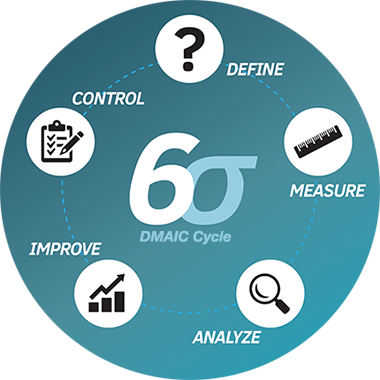
Six Sigma was first introduced in 1986 by an engineer at Motorola named Bill Smith. Six Sigma is a methodology that focuses on measuring quality and aiming for perfection. The techniques and tools used for process improvement and eliminating defects are the core of Six Sigma. While the methodology began in the manufacturing industry, today the Six Sigma techniques are used in virtually every type of industry.

Note - no one is saying that we should treat students like products. The intent of using some of these systems in education is to streamline processes and remove errors and issues. 

Six Sigma can also be used in Education. Back in 2012 I wrote an article entitled "Business/Manufacturing ideas applied to education" in which I detailed how United Technologies' "ACE" system could be applied to Education and Six Sigma is similar to that.

There are three primary elements in Six Sigma:
  • Process Improvement – Process improvement is used to eliminate root causes of deficiencies in the organization. 
  • Process Design (or re-design) – Creating entirely new processes or re-designing existing processes that do not work properly and are beyond the scope of simple process improvement.
  • Process Management – This element consists of tasks such as defining processes, measuring performance, analyzing data, and more.
These could be used in schools for all processes and procedures including:
  • opening of schools
  • discipline issues
  • tracking and supporting students
And much more.

DMAIC Cycle

Here is a great article on Six Sigma that explains each part of it and how it works: https://www.creativesafetysupply.com/articles/six-sigma/

And here are some more articles about Six Sigma in Education:

Six Sigma in Education

Using Six Sigma to Solve Issues in Public School System

And some more related articles:

Tuesday, August 30, 2016

Free eBook of Back-to-School Tips and Resources for Teachers, by teachers


Apperson Offers New Free eBook of Back-to-School Tips and Resources for Teachers. This is a great, free, eBook that offers more than 50 ideas and free, downloadable activities to help teachers kick off the 2016-17 school year.

To download the eBook, visit http://www.apperson.com/lp/back-school-ebook.


These are teacher-provided strategies, tips and activities, organized into an informative, easy-to-read PDF file that teachers can download and share.

Some of the eBook’s highlights include:
  • Back-to-school must-haves for the classroom 
  • Tips on how to build strong relationships with students and parents from day one
  • Seven ideas to make test prep fun
  • 10 books to help students understand their feelings
  • Classroom activities that teach social-emotional skills and promote positive attitudes
  • Free resources and tips on nutrition, organizational strategies, apps, and more
Download for free and take a look.


Related Resources:

Welcome Back to School - tips, resources and more to help you get off to a great start.


--

Monday, August 22, 2016

Welcome Back to School - tips, resources and more to help you get off to a great start.


Welcome back to school! I hope everyone had a great summer and was able to relax and recharge. Most schools around here start next week, with new teachers starting this week.

The beginning of the year is always a little crazy for all teachers. Getting your room setup, implementing new ideas into your lesson plans, getting to know your students, and just settling back in to the routine can be busy and stressful. Remember to not over do it and take time for yourself.

One thing I've done in the past that helped me is using a check list of everything I have to do when school starts, including setting up my room (computer, bulletin boards, etc), things I want to post in my room, lesson ideas and more in Evernote. I modify it each year, adding new things for the following year.

Here are some more tips, resources, and help to get your school year started on a positive note, and keep it that way.

Advice to New College Graduates about to enter the Teaching profession

Summary of new teacher tips, urban schools issues, technology resources


Google for Educators - Google has a huge number of free resources for teachers and students. Check them all out (they're all free).

Evernote for Education Resources - the ultimate note taking, web clipping, lesson planning resource

Create a Personal Learning Network - a PLN is an excellent resource for help, advice, and sharing ideas.

Overview of some free technology that can help you be more organized and efficient.


Good luck and I hope everyone has a great school year!!


-

Thursday, July 21, 2016

Microsoft Education Resources, including Office 365


Microsoft

Microsoft has a lot of Education resources for IT, Educators and Students. Here are some of them that I have found useful.


Microsoft for Education Resources


Office 365 Training Resources


--

Our Blog

55 Cups
Average weekly coffee drank
9000 Lines
Average weekly lines of code
400 Customers
Average yearly happy clients

Our Team

Tim Malkovic
CEO
David Bell
Creative Designer
Eve Stinger
Sales Manager
Will Peters
Developer

Contact

Talk to us

Lorem ipsum dolor sit amet, consectetur adipisicing elit. Dolores iusto fugit esse soluta quae debitis quibusdam harum voluptatem, maxime, aliquam sequi. Tempora ipsum magni unde velit corporis fuga, necessitatibus blanditiis.

Address:

9983 City name, Street name, 232 Apartment C

Work Time:

Monday - Friday from 9am to 5pm

Phone:

595 12 34 567