We Are Creative Design Agency

Lorem ipsum dolor sit amet, consectetur adipisicing elit. Illum, fuga, consectetur sequi consequuntur nisi placeat ullam maiores perferendis. Quod, nihil reiciendis saepe optio libero minus et beatae ipsam reprehenderit sequi.

Find Out More Purchase Theme

Our Services

Lovely Design

Lorem ipsum dolor sit amet, consectetur adipiscing elit. Praesent feugiat tellus eget libero pretium, sollicitudin feugiat libero.

Read More

Great Concept

Lorem ipsum dolor sit amet, consectetur adipiscing elit. Praesent feugiat tellus eget libero pretium, sollicitudin feugiat libero.

Read More

Development

Lorem ipsum dolor sit amet, consectetur adipiscing elit. Praesent feugiat tellus eget libero pretium, sollicitudin feugiat libero.

Read More

User Friendly

Lorem ipsum dolor sit amet, consectetur adipiscing elit. Praesent feugiat tellus eget libero pretium, sollicitudin feugiat libero.

Read More

Recent Work

Friday, September 16, 2016

Ex Google Play Marketing Chief Hired to Help Students Enter "Workplace of the Future"


Consider this: Bill Gates has poured billions of dollars into what he calls the “future of learning” - and Mark Zuckerberg just announced a new $50M ed-tech investment. Both with a big push towards personalized learning.

Course Hero, now led by a new CMO - former Google Play Marketing chief, Patrick Mork - wants to also bet on students, by democratizing access to study materials: its 12.5M users, to be exact.

By tackling the “The 4 Ls” - crucial problems that students and educators face today - this college student favorite wants to change the way students learn, study, and succeed in the “workplace of the future”.


What are the 4 L’s? It’s lack of:

#1 TIME:
Students today have less time than ever before to master their course material because of more classwork, homework, multiple study groups, extra-curricular activities, and even side jobs to pay their ballooning student bills.

#2 MASTERY:
Students learn the same material at the same pace but are often not mastering the full content, resulting in an unstable foundation.

#3 COLLABORATION:
Collaboration is the absolute norm in the modern workplace, with tools like Slack, Google Docs, Box, and Asana. In fact, the time spent by employees in collaborative activities has ballooned by 50% or more in the past 20 years. Yet, many classrooms are still focused on individualized learning and individual contribution, which may not prepare graduates for the workplace of the future.

#4 PERSONALIZATION:

The sheer number of students per class poses a hard challenge for educators and TA’s in assisting the needs of each student. Educators just can’t personalize if they’re dealing with an over-crowded classroom.

In the last 12 months alone, the platform’s content library has grown over 50%, it has added 170,000 pieces of Course Advice (from virtually zero) and its user base now exceeds 12.5M users.


##########################

Course Hero Graduates: Unveils a Brand refresh and Makes Key Hires to Accelerate White Hot Growth

Hires Google, Yahoo! and VMWare executives as it powers through 145+% user growth

REDWOOD CITY, Calif. Course Hero, an online learning platform that empowers millions of students and educators to succeed, today is announcing major growth metrics, three big name hires hailing from Google, Yahoo!, and VMWare, and a corporate rebrand to better position itself for the hard-to-reach but very important demographics of students and educators.

Course Hero is a crowdsourced learning platform where students and educators share and access millions of course-specific educational resources, get 24/7 online tutoring, and create flashcards. In the last 12 months alone, the platform’s content library has grown over 50%, it has added 170,000 pieces of Course Advice (from virtually zero) and its user base now exceeds 12.5M users.

“I’m incredibly proud of the work the Course Hero team has done to support students and democratize access to course-specific study materials,” said company co-founder and CEO, Andrew Grauer. “I’m also proud of the work we’re doing to support educators as the Course Hero platform now serves more than 85,000 free educator accounts. These accounts enable them to share their own materials with other educators and students and get access to each other’s materials. Our aim is to bring educators together. We want to help them find new inspiration, learn new techniques, and investigate multiple perspectives to learn from each other, save valuable time, and get better learning outcomes for students.”

To continue this trajectory of rapid growth in serving both students and educators, Course Hero has also brought on a slate of top leadership, and is introducing an exciting new brand identity.

To help accelerate this growth and scale the company's marketing and partnerships team, the company recently hired Patrick Mork as its new Chief Marketing Officer. Mork, who led the rebrand initiative, has an impressive career background that includes building and leading the marketing team that launched the Google Play store. He is joined by new VP of Engineering Lynne Thieme, formerly VP of Engineering at Idealist and a member of the Alumni board at University of Illinois Urbana-Champaign. Thieme’s career also includes positions at VMware, Oracle and IBM. Lastly, the company also brought on CFO Stephen Van Horne who was previously CFO at Get Insured and brings years of experience from Yahoo!, Ignite! and Bechtel.

About Course Hero | Master Your ClassesTM

Headquartered in Silicon Valley, Course Hero is a venture-backed online learning platform that empowers millions of students and educators to succeed. Fueled by a passionate community of students and educators who share their course-specific knowledge and educational resources, Course Hero offers the biggest and best library of study documents, expert tutors, customizable flashcards, and course advice. The company was named a Top Workplace by the Bay Area News Group. Download the Course Hero app for iPhone or Android today or follow Course Hero on CrunchBase and AngelList.


--

Friday, September 9, 2016

Microsoft Education Community - great, free resource for teachers

Microsoft


The Microsoft Education Community is a great, free resource for teachers. It has free web courses on using Microsoft tools and on best practices for using technology in education. There are discussion groups, resources and training tools available. You can earn badges and certifications through the site also.


The site is easy to navigate and has some excellent resources. The training goes from the basics of using email, to Office 365 to new products like Sway. It also includes 21st Century Learning, Accessibility and more. Teachers share resources here, as well as providing support and feedback to each other. There are even some great virtual field trips.


Check it out!


Related:

Microsoft Education Resources, including Office 365


.

Remembering 9/11 - 15 years later


I was in EMS for 22 years before retiring due to a back injury. One of my most memorable experiences was responding to New York City as a Paramedic in the aftermath of the terrorist attacks of 9/11. I will never forget that experience. What I saw and did are still with me, as is a type of asthma from breathing the dust. My Experience as a Paramedic on 9-11-01 


As the years have gone by, I've noticed that people are not remembering this terrible event like they did the first few years after. I know that my EMS, Fire and Police colleagues all do, as do the brave men and women of our armed forces who fight every day against terrorism.

I've also noticed less being done in schools lately. Most of today's students weren't even born when 9/11 occurred. Please teach them about it (facts only please) and make sure they understand what it means.


I will never forget that day, my experiences, and the EMS Brothers and Sisters lost on that day:


United We Stood, United We Stand

Today is a day Americans will never forget.
It is a day of remembrance, a day of reflection and a day to be proud.
It is a day we honor and remember the thousands of lives lost, the survivors, and those who rose up in service in response to the attacks on 9-11-2001.
It is a day we pay tribute to and reflect on the sacrifices of the public safety workers and the men and women in our military who serve us and protect us 365 days a year.
It is a day Americans can be proud of the way we came together following the attacks on 9-11.
United We Stood. United We Stand.


Here are some more resources about my experience on 9/11 and 9/11 in general:

My Experience as a Paramedic on 9-11-01

Remembering 9/11 (from 2009)

http://www.history.com/content/9-11/102-minutes

http://makehistory.national911memorial.org/

http://www.national911memorial.org/site/PageServer?pagename=New_Home

http://www.time.com/time/photogallery/0,29307,1921566_1932073,00.html

http://larryferlazzo.edublogs.org/2008/08/13/the-best-sites-to-help-teach-about-911/


-

Wednesday, August 31, 2016

Six Sigma in Education - applying quality control systems in education


Six Sigma was first introduced in 1986 by an engineer at Motorola named Bill Smith. Six Sigma is a methodology that focuses on measuring quality and aiming for perfection. The techniques and tools used for process improvement and eliminating defects are the core of Six Sigma. While the methodology began in the manufacturing industry, today the Six Sigma techniques are used in virtually every type of industry.

Note - no one is saying that we should treat students like products. The intent of using some of these systems in education is to streamline processes and remove errors and issues. 

Six Sigma can also be used in Education. Back in 2012 I wrote an article entitled "Business/Manufacturing ideas applied to education" in which I detailed how United Technologies' "ACE" system could be applied to Education and Six Sigma is similar to that.

There are three primary elements in Six Sigma:
  • Process Improvement – Process improvement is used to eliminate root causes of deficiencies in the organization. 
  • Process Design (or re-design) – Creating entirely new processes or re-designing existing processes that do not work properly and are beyond the scope of simple process improvement.
  • Process Management – This element consists of tasks such as defining processes, measuring performance, analyzing data, and more.
These could be used in schools for all processes and procedures including:
  • opening of schools
  • discipline issues
  • tracking and supporting students
And much more.

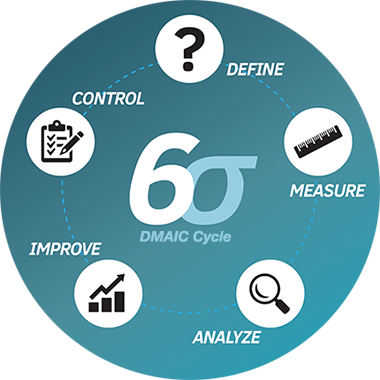
DMAIC Cycle

Here is a great article on Six Sigma that explains each part of it and how it works: https://www.creativesafetysupply.com/articles/six-sigma/

And here are some more articles about Six Sigma in Education:

Six Sigma in Education

Using Six Sigma to Solve Issues in Public School System

And some more related articles:

Tuesday, August 30, 2016

Free eBook of Back-to-School Tips and Resources for Teachers, by teachers


Apperson Offers New Free eBook of Back-to-School Tips and Resources for Teachers. This is a great, free, eBook that offers more than 50 ideas and free, downloadable activities to help teachers kick off the 2016-17 school year.

To download the eBook, visit http://www.apperson.com/lp/back-school-ebook.


These are teacher-provided strategies, tips and activities, organized into an informative, easy-to-read PDF file that teachers can download and share.

Some of the eBook’s highlights include:
  • Back-to-school must-haves for the classroom 
  • Tips on how to build strong relationships with students and parents from day one
  • Seven ideas to make test prep fun
  • 10 books to help students understand their feelings
  • Classroom activities that teach social-emotional skills and promote positive attitudes
  • Free resources and tips on nutrition, organizational strategies, apps, and more
Download for free and take a look.


Related Resources:

Welcome Back to School - tips, resources and more to help you get off to a great start.


--

Monday, August 22, 2016

Welcome Back to School - tips, resources and more to help you get off to a great start.


Welcome back to school! I hope everyone had a great summer and was able to relax and recharge. Most schools around here start next week, with new teachers starting this week.

The beginning of the year is always a little crazy for all teachers. Getting your room setup, implementing new ideas into your lesson plans, getting to know your students, and just settling back in to the routine can be busy and stressful. Remember to not over do it and take time for yourself.

One thing I've done in the past that helped me is using a check list of everything I have to do when school starts, including setting up my room (computer, bulletin boards, etc), things I want to post in my room, lesson ideas and more in Evernote. I modify it each year, adding new things for the following year.

Here are some more tips, resources, and help to get your school year started on a positive note, and keep it that way.

Advice to New College Graduates about to enter the Teaching profession

Summary of new teacher tips, urban schools issues, technology resources


Google for Educators - Google has a huge number of free resources for teachers and students. Check them all out (they're all free).

Evernote for Education Resources - the ultimate note taking, web clipping, lesson planning resource

Create a Personal Learning Network - a PLN is an excellent resource for help, advice, and sharing ideas.

Overview of some free technology that can help you be more organized and efficient.


Good luck and I hope everyone has a great school year!!


-

Thursday, July 21, 2016

Microsoft Education Resources, including Office 365


Microsoft

Microsoft has a lot of Education resources for IT, Educators and Students. Here are some of them that I have found useful.


Microsoft for Education Resources


Office 365 Training Resources


--

Wednesday, June 22, 2016

Google for Education Sessions and Discussions at ISTE 2016


Google will be hosting some great sessions and discussions at ISTE next week.


We hope to see you at ISTE 2016 in Denver. Visit us in Room #103 (street level of convention the center) where educators and Googlers will be giving short presentations throughout the conference. We look forward to seeing you.

Full Schedule


----

Monday, June 20, 2016

ISTE 2016 - Some Great Sessions to consider attending, including 2 by me


ISTE 2016 is only a week away! There are so many great sessions to attend throughout the conference, but I wanted to share a few here, including two that I am doing.

These sessions are geared at educators and administrators and will offer some great information and resources. Presenters are former educators and educational technology specialists (and a CIO).

RSVP HERE. or click on the image.


----

Friday, May 27, 2016

How educators and teachers can get the most out of online forms software - guest post

How educators and teachers can get the most out of online forms software

Online forms might not be the first thing that comes to mind as a helpful classroom tool. 10 years ago the idea would have seemed absurd. But today? Online form tools can save hours, paper, and your budget.

That’s because the way students and teachers interact with technology has completely changed.

I work for JotForm, a popular online form building platform, and below are a few of the popular ways that we’ve noticed educators are utilizing online forms.

Survey students and get instant results
Depending on your classroom cell phone policy, you could have all of your students submit survey responses at the same time straight from their phones and have the results show on a screen in front of the room. Interactive learning has come a long way, and online form builders have mobile-ready forms at the click of a button.

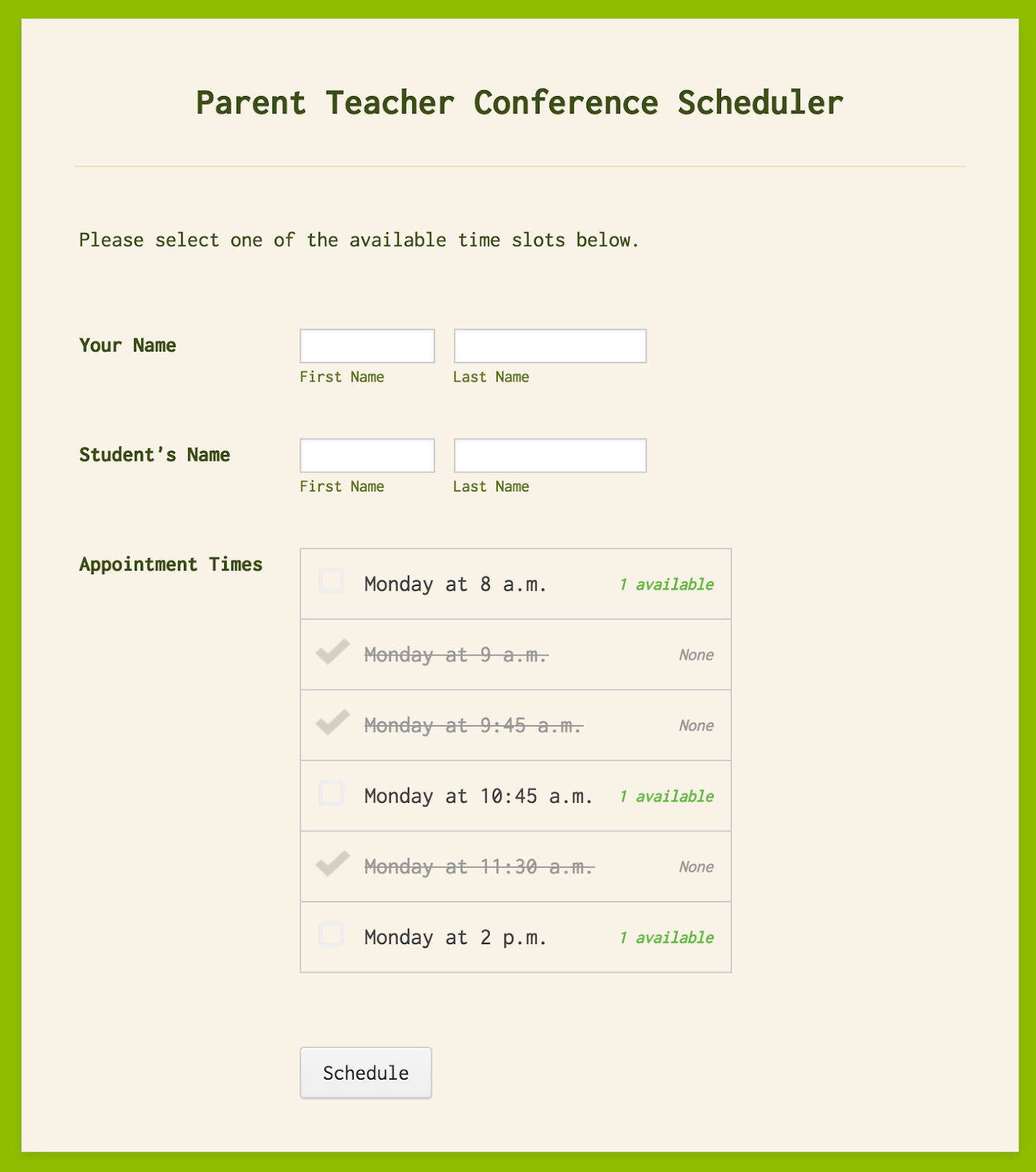
Scheduling parent conferences
Imagine a world where the only thing you needed to do to schedule important one-on-one meetings was just to distribute a single form that lets the recipient know what remaining slots are available.

Screen Shot 2016-02-04 at 3.50.12 PM.png


Paperless quizzing
A quick trip to the computer lab is all it takes to administer a paperless quiz using an online form that grades itself and provides instant feedback immediately upon submission. Quiz responses can be sent directly to your inbox or integrated into a spreadsheet to make it easy to compare which questions students consistently had trouble with or answered correctly.

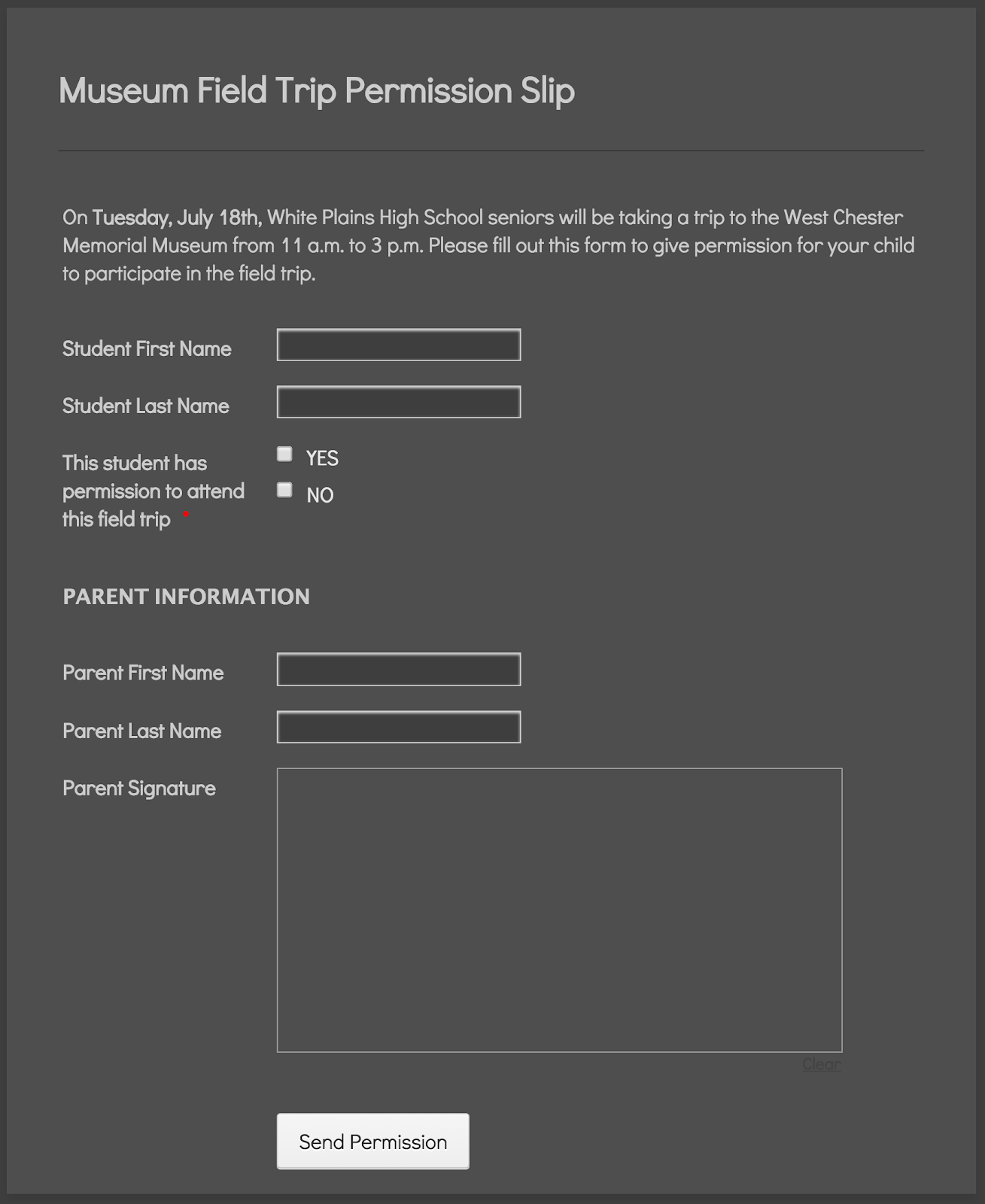
Collect signatures digitally
If you need signatures from a parent, skip the middle man (or child). Send permission slip and waiver forms straight to parents’ emails and use the e-signature capabilities already built into the form. No more printed paper, forged signatures, or nagging students to return the completed form. The added benefit to this method is that you don’t have to worry about organization; all of your signatures are neatly stored for you.

Screen Shot 2016-02-04 at 4.00.09 PM.png

Student group project evaluations
It can be tough for students to give accurate feedback about fellow students for group projects, especially when one of them didn’t pull their weight. That’s why an anonymously submitted online form can be so effective: it encourages honest feedback. Consider open-ended questions like “how well do you think the group performed?”.

Online form building software has increasingly become a fixture in schools all around the world over the past decade, and for good reason: it just makes collecting and organizing information easier. The best part is that it’s insanely affordable. Most form builders are free based on a certain threshold of monthly responses, and generally pretty cheap even for the paid plans.

Chad Reid is the director of communications at JotForm, a popular online form building platform based in San Francisco.


-

Monday, May 23, 2016

Lots of great new things coming to Google Apps and Chromebooks!!!


Google Apps for Education New logo.pngchromebooks-apps-flyout-in.jpg


Google Apps for Education and Chromebooks have become truly awesome resources for schools and Google just keeps improving them.

Here are some of the recent announcements:


Android apps are coming to Chromebooks! - some Android apps have already been available for use on a Chromebook. I've been using the Evernote app for a while and love it. But in order to get them to work, developers had to do some work themselves. With this new announcement, the Google Play Store and most of it's app will work with Chromebooks. Three models are getting access in June with more getting access later. See this link for full details on which Chromebooks will get this and when. This is huge for schools as they will be able to benefit from the low cost and ease of use and management of Chromebooks, and use all of the great Android apps that are out there.

With this announcement, touchscreen Chromebooks are even more functional for schools. For specs, 4GB RAM is always my suggestion and 16GB drives should be fine unless you are installing a ton of apps and syncing lots of data. I have over 100 apps on my smartphone, sync Evernote offline (9,000 notes) and sync Google drive offline and I am only using 9GB (18GB if you count the hundreds of photos and videos of my daughter).

I also think that this would be a good time for Google and OEMs to work on a 7" Chrome OS tablet! Think about it - all the Android apps in a small form factor for younger students or mobility, with the management features and ease of use of a Chromebook!


Google Classroom updates:
  1. Interact with other apps and systems - more software and systems will be able to interact with more data in Classroom. One example that teachers will love is the ability for Gradebooks and reporting systems to sync grades with Classroom, eliminating the need for teachers to manually transfer grades.
  2. Teachers can schedule assignments, questions, or announcements to post at a later date. The post is then automatically published to the class stream at the scheduled date and time.
  3. Teachers can poll their students using multiple-choice questions and allow students to see a summary of their classmates answers.


Cover art
Science Journal - a new app that is a digital science notebook that allows students to record data from sensors on an Android phone or connected device, take notes, observer, interpret, predict, create graphs and much more.


Google also announced that they are making their own 3D/Virtual reality hardware that will be prefect for schools - this will fit well with Expeditions and allow students to explore the world, and beyond, right from their classroom.


Some exciting news for schools!!


More Resources:

Benefits of Google Apps and Chromebooks for Schools

Wednesday, May 11, 2016

Great resources on Digital Equity from CoSN (free)


As schools go more and more digital with systems, curriculum, assignments and more, they face the need to provide equity in digital access for their students. Student devices are part of it, but so is internet access at home.

This year has seen a huge increase in attention to "Digital Equity" or the "Digital Divide". Here are some great free resources from CoSN ( Consortium for School Networking ) that can help you understand the issue, and address it.

CoSN - Go to Home Page

Digital Equity Action Toolkit

Students without home access to high quality broadband connectivity are at a disadvantage, unable to realize the full power of digital learning. Only 3 percent of teachers in high-poverty schools said that their students had the digital tools necessary to complete homework assignments, compared to 52 percent of teachers in more affluent schools, a discrepancy sometimes labeled the "homework gap."
To address this key challenge, CoSN launched the Digital Equity Action Agenda initiative. This effort highlights how some school districts are building meaningful community partnerships and creating tools to help district leaders get started in achieving digital equity.
Our new toolkit provides educational leaders with the information they need to address digital equity in out-of-school learning. As a member said:
"The CoSN Digital Equity Action Toolkit is the best and most practical document I have seen on this topic." --Devin Vodicka, Superintendent, Vista USD, California

Download the ToolKit here: http://www.cosn.org/digital-equity-action-toolkit-february-2016


Digital Equity Infographic (click to go to original PDF)


More resources

Digital Divide Resources

Digital Literacy Resources

Digital Equity Resources


-

Tuesday, May 10, 2016

Technology I use on a Daily Basis - 2016 Version


In the past, I've written about the technology I use on a daily basis (see bottom of page for links).

Here's my updated version for Spring, 2016.

I am a K-12 Education Strategist for CDW-G. In this role, I work with schools on selecting and implementing technology solutions to improve teaching and learning. I do a lot of research on best practices in education and technology and do a decent amount of traveling.

I'm a huge user of Google Apps and Evernote. They are my main work, and personal tools, and all of my devices work with them. Without these, I'm stuck. I also back them both up.

My day typically consists of email conversations and support with our account managers and customers, Google Hangouts with customers providing support, advice, strategy planning, training and professional development, and doing online research, as well as creating tools and resources, like presentations and reference materials. If I am traveling, I only bring my smartphone and my Acer Flip Chromebook and am able to do everything I need to with them. I have Citrix for my Chromebook so I can remote in to our system and access everything I need, including a Windows desktop.


My personal smartphone is an LG G4 running Android. I love it. I can do anything on it - email, web browsing, Google Apps, Evernote, messaging, photos, musics, etc. I is my go-to device. I have an spare battery and external battery for traveling, but the battery life is pretty good. It's also durable, as I've dropped it a few times and it's still here. My work smartphone is a Samsung Galaxy 7 which I use when traveling. I like it, but I like LG's software and screen size better. I use it as a mobile hotspot for my Chromebook while traveling too.


I have the same work and personal laptop - an HP Elitebook Folio 9470m with Core i5 processors and SSD drives. It's lightweight, powerful and works great. I use it at work with a docking station and two monitors. At home, I use my personal one for remoting into work via Citrix, and some other tasks, but mainly just for work tasks when working from home.


My travel device, home use and work use, is my Acer C738T Touch/Flip Chromebook. I have the 4GB Ram version. It's light, has a great battery life, and does everything I need it to do, including work offline. I use it for travel, conferences and off-site meetings. I use it at home sometimes when I need to type. I have both my personal and work profiles on here, with offline Drive access for both setup. I also have the Evernote Android app for Chromebooks on it, with offline sync enabled. I have also added the Google Play Movie/TV app so that I can download movies for offline viewing while traveling. This thing is amazing and has been replacing my need for any other devices.

I also have an LG GPad 8.3" LTE tablet that I got for free when I got my LG G4 smartphone. I use this at home for media consumption - Facebook, Google+, Twitter, Movies, Music. Great device.


Google Apps - for both work and home. Email, Chrome, Calendar, Drive/Docs/Sheets/Slides, Keep, Blogger, Sites - these are my main tools for work and personal use. All of my files are in Drive, and backed up on my personal laptop. I also use a Google account at work with my files in Drive. I have two work accounts - one for work itself (K12 team uses it), and a GAFE account for working with customers. I use a Google Sheet as my project management tool, with hyper links to Docs and other files. Each project gets a separate row, with notes, contacts, follow up tasks and more.


Evernote - this is my other main tool - web clippings, receipts, manuals, project management, important info, contacts, reference material and more. I have the Evernote clipper installed on Chrome and in Outlook. I also have the Evernote Scanner which I use to digitize everything that is paper based. It automatically scans both sides, very quickly, and then sorts things into the proper notebooks in Evernote based on what they are (document, business card, receipt, photo, etc). Great tool for going paperless.

Outlook and Lync at work for email and instant messaging. I have my work email and Lync setup on my smartphones also.

Sites and services I use include Feedly feed reader, Pocket, LinkedIn, TweetDeck, Google+ and Facebook. I spend most of my time on Feedly and Google+, researching and connecting with others.

That's really it. I rarely use anything else and I have different tools for different things - work, home, travel, fun.

Take a look back at earlier versions of this post to see what has changed over the years based on my job and the tech available. I've definitely changed with the apps I use and have less hardware. In fact, my Acer C738T Chromebook is slowly becoming the only device I really need, besides a smartphone.


Related:

Technology I use on a Daily Basis - 2015 Version

Technology I'm using daily as a School District CIO (2012)

Technology I use on a Daily Basis - updated for this year (Oct 2011)

Our Blog

55 Cups
Average weekly coffee drank
9000 Lines
Average weekly lines of code
400 Customers
Average yearly happy clients

Our Team

Tim Malkovic
CEO
David Bell
Creative Designer
Eve Stinger
Sales Manager
Will Peters
Developer

Contact

Talk to us

Lorem ipsum dolor sit amet, consectetur adipisicing elit. Dolores iusto fugit esse soluta quae debitis quibusdam harum voluptatem, maxime, aliquam sequi. Tempora ipsum magni unde velit corporis fuga, necessitatibus blanditiis.

Address:

9983 City name, Street name, 232 Apartment C

Work Time:

Monday - Friday from 9am to 5pm

Phone:

595 12 34 567