We Are Creative Design Agency

Lorem ipsum dolor sit amet, consectetur adipisicing elit. Illum, fuga, consectetur sequi consequuntur nisi placeat ullam maiores perferendis. Quod, nihil reiciendis saepe optio libero minus et beatae ipsam reprehenderit sequi.

Find Out More Purchase Theme

Our Services

Lovely Design

Lorem ipsum dolor sit amet, consectetur adipiscing elit. Praesent feugiat tellus eget libero pretium, sollicitudin feugiat libero.

Read More

Great Concept

Lorem ipsum dolor sit amet, consectetur adipiscing elit. Praesent feugiat tellus eget libero pretium, sollicitudin feugiat libero.

Read More

Development

Lorem ipsum dolor sit amet, consectetur adipiscing elit. Praesent feugiat tellus eget libero pretium, sollicitudin feugiat libero.

Read More

User Friendly

Lorem ipsum dolor sit amet, consectetur adipiscing elit. Praesent feugiat tellus eget libero pretium, sollicitudin feugiat libero.

Read More

Recent Work

Monday, June 20, 2016

ISTE 2016 - Some Great Sessions to consider attending, including 2 by me


ISTE 2016 is only a week away! There are so many great sessions to attend throughout the conference, but I wanted to share a few here, including two that I am doing.

These sessions are geared at educators and administrators and will offer some great information and resources. Presenters are former educators and educational technology specialists (and a CIO).

RSVP HERE. or click on the image.


----

Friday, May 27, 2016

How educators and teachers can get the most out of online forms software - guest post

How educators and teachers can get the most out of online forms software

Online forms might not be the first thing that comes to mind as a helpful classroom tool. 10 years ago the idea would have seemed absurd. But today? Online form tools can save hours, paper, and your budget.

That’s because the way students and teachers interact with technology has completely changed.

I work for JotForm, a popular online form building platform, and below are a few of the popular ways that we’ve noticed educators are utilizing online forms.

Survey students and get instant results
Depending on your classroom cell phone policy, you could have all of your students submit survey responses at the same time straight from their phones and have the results show on a screen in front of the room. Interactive learning has come a long way, and online form builders have mobile-ready forms at the click of a button.

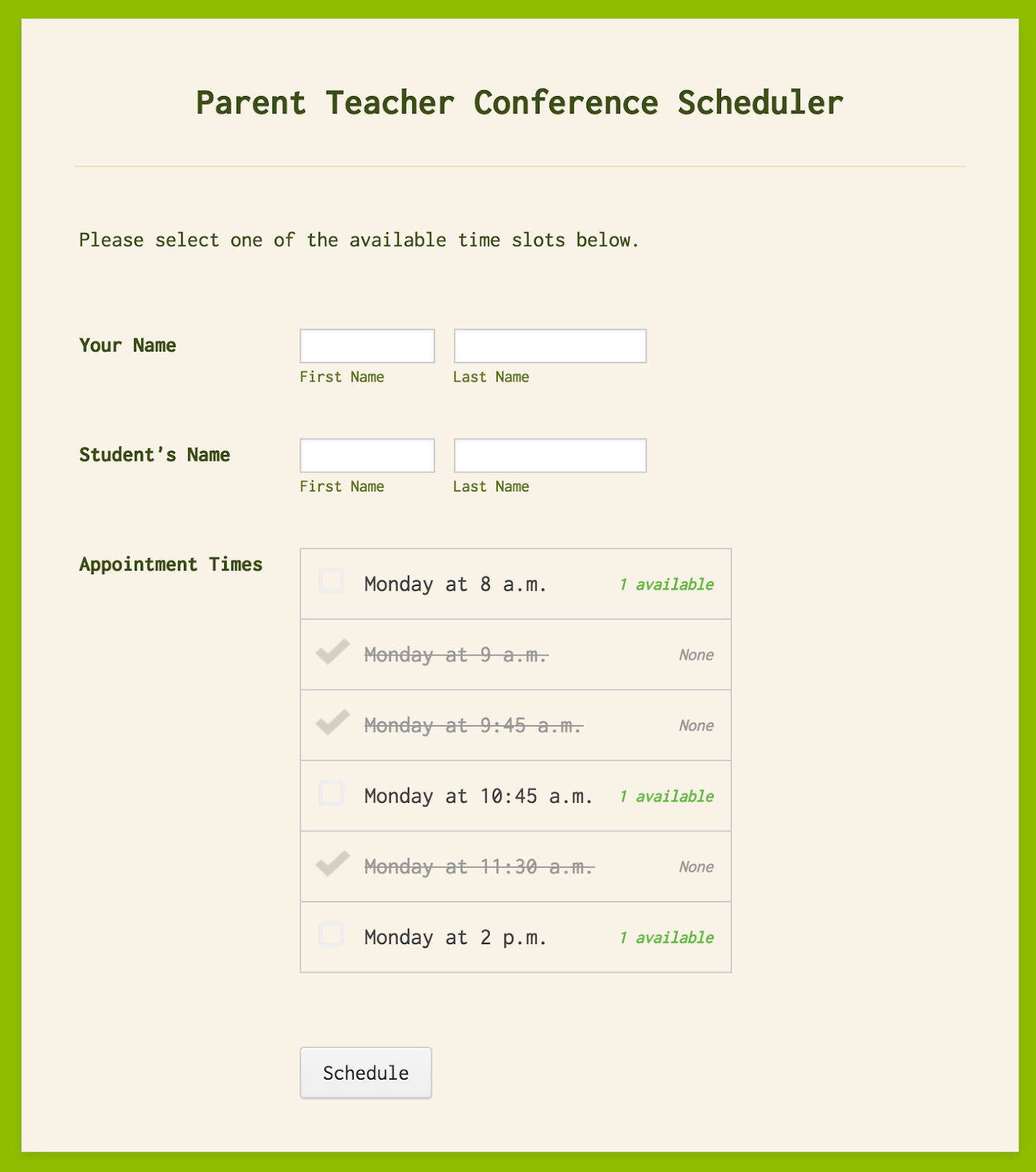
Scheduling parent conferences
Imagine a world where the only thing you needed to do to schedule important one-on-one meetings was just to distribute a single form that lets the recipient know what remaining slots are available.

Screen Shot 2016-02-04 at 3.50.12 PM.png


Paperless quizzing
A quick trip to the computer lab is all it takes to administer a paperless quiz using an online form that grades itself and provides instant feedback immediately upon submission. Quiz responses can be sent directly to your inbox or integrated into a spreadsheet to make it easy to compare which questions students consistently had trouble with or answered correctly.

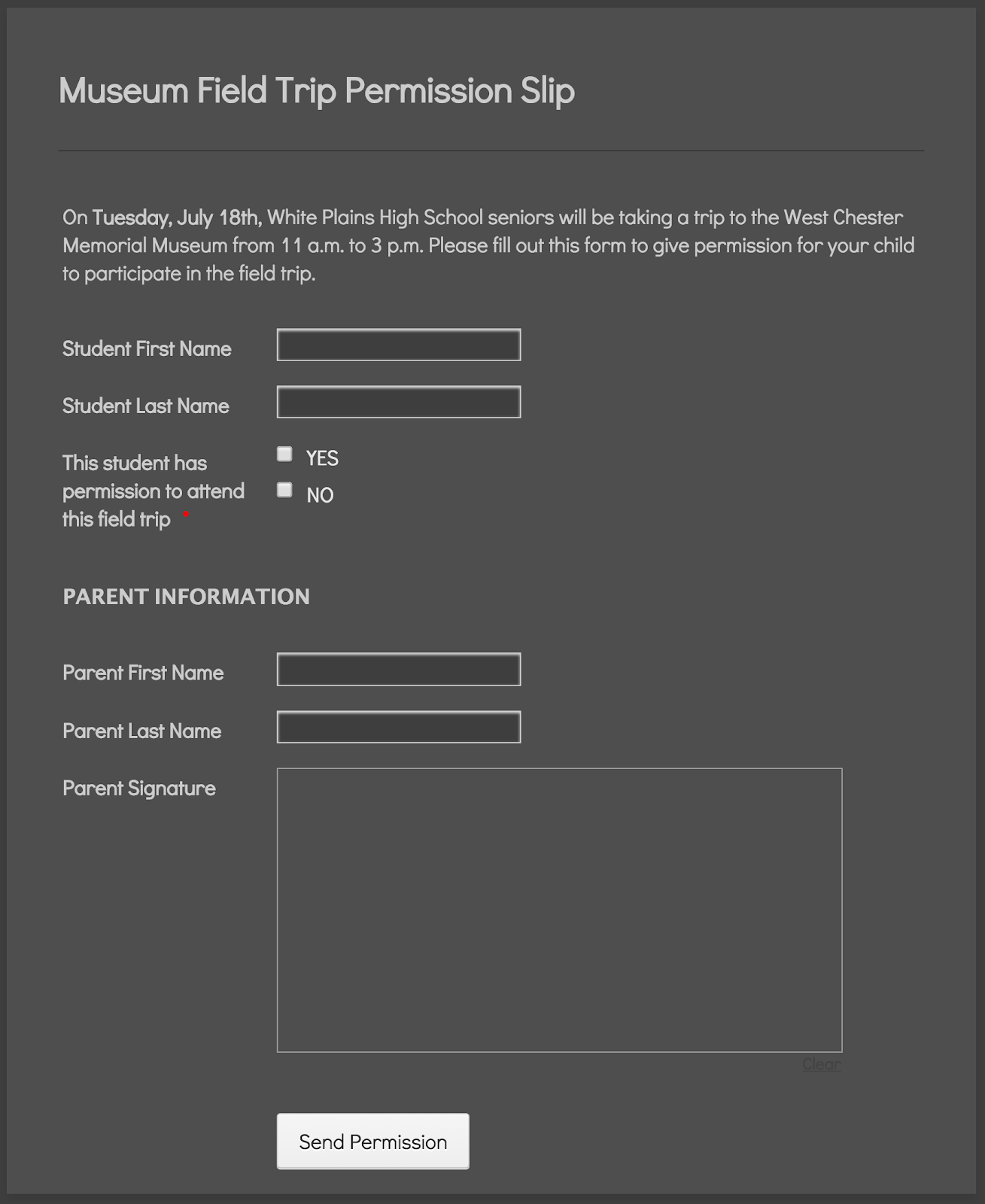
Collect signatures digitally
If you need signatures from a parent, skip the middle man (or child). Send permission slip and waiver forms straight to parents’ emails and use the e-signature capabilities already built into the form. No more printed paper, forged signatures, or nagging students to return the completed form. The added benefit to this method is that you don’t have to worry about organization; all of your signatures are neatly stored for you.

Screen Shot 2016-02-04 at 4.00.09 PM.png

Student group project evaluations
It can be tough for students to give accurate feedback about fellow students for group projects, especially when one of them didn’t pull their weight. That’s why an anonymously submitted online form can be so effective: it encourages honest feedback. Consider open-ended questions like “how well do you think the group performed?”.

Online form building software has increasingly become a fixture in schools all around the world over the past decade, and for good reason: it just makes collecting and organizing information easier. The best part is that it’s insanely affordable. Most form builders are free based on a certain threshold of monthly responses, and generally pretty cheap even for the paid plans.

Chad Reid is the director of communications at JotForm, a popular online form building platform based in San Francisco.


-

Monday, May 23, 2016

Lots of great new things coming to Google Apps and Chromebooks!!!


Google Apps for Education New logo.pngchromebooks-apps-flyout-in.jpg


Google Apps for Education and Chromebooks have become truly awesome resources for schools and Google just keeps improving them.

Here are some of the recent announcements:


Android apps are coming to Chromebooks! - some Android apps have already been available for use on a Chromebook. I've been using the Evernote app for a while and love it. But in order to get them to work, developers had to do some work themselves. With this new announcement, the Google Play Store and most of it's app will work with Chromebooks. Three models are getting access in June with more getting access later. See this link for full details on which Chromebooks will get this and when. This is huge for schools as they will be able to benefit from the low cost and ease of use and management of Chromebooks, and use all of the great Android apps that are out there.

With this announcement, touchscreen Chromebooks are even more functional for schools. For specs, 4GB RAM is always my suggestion and 16GB drives should be fine unless you are installing a ton of apps and syncing lots of data. I have over 100 apps on my smartphone, sync Evernote offline (9,000 notes) and sync Google drive offline and I am only using 9GB (18GB if you count the hundreds of photos and videos of my daughter).

I also think that this would be a good time for Google and OEMs to work on a 7" Chrome OS tablet! Think about it - all the Android apps in a small form factor for younger students or mobility, with the management features and ease of use of a Chromebook!


Google Classroom updates:
  1. Interact with other apps and systems - more software and systems will be able to interact with more data in Classroom. One example that teachers will love is the ability for Gradebooks and reporting systems to sync grades with Classroom, eliminating the need for teachers to manually transfer grades.
  2. Teachers can schedule assignments, questions, or announcements to post at a later date. The post is then automatically published to the class stream at the scheduled date and time.
  3. Teachers can poll their students using multiple-choice questions and allow students to see a summary of their classmates answers.


Cover art
Science Journal - a new app that is a digital science notebook that allows students to record data from sensors on an Android phone or connected device, take notes, observer, interpret, predict, create graphs and much more.


Google also announced that they are making their own 3D/Virtual reality hardware that will be prefect for schools - this will fit well with Expeditions and allow students to explore the world, and beyond, right from their classroom.


Some exciting news for schools!!


More Resources:

Benefits of Google Apps and Chromebooks for Schools

Wednesday, May 11, 2016

Great resources on Digital Equity from CoSN (free)


As schools go more and more digital with systems, curriculum, assignments and more, they face the need to provide equity in digital access for their students. Student devices are part of it, but so is internet access at home.

This year has seen a huge increase in attention to "Digital Equity" or the "Digital Divide". Here are some great free resources from CoSN ( Consortium for School Networking ) that can help you understand the issue, and address it.

CoSN - Go to Home Page

Digital Equity Action Toolkit

Students without home access to high quality broadband connectivity are at a disadvantage, unable to realize the full power of digital learning. Only 3 percent of teachers in high-poverty schools said that their students had the digital tools necessary to complete homework assignments, compared to 52 percent of teachers in more affluent schools, a discrepancy sometimes labeled the "homework gap."
To address this key challenge, CoSN launched the Digital Equity Action Agenda initiative. This effort highlights how some school districts are building meaningful community partnerships and creating tools to help district leaders get started in achieving digital equity.
Our new toolkit provides educational leaders with the information they need to address digital equity in out-of-school learning. As a member said:
"The CoSN Digital Equity Action Toolkit is the best and most practical document I have seen on this topic." --Devin Vodicka, Superintendent, Vista USD, California

Download the ToolKit here: http://www.cosn.org/digital-equity-action-toolkit-february-2016


Digital Equity Infographic (click to go to original PDF)


More resources

Digital Divide Resources

Digital Literacy Resources

Digital Equity Resources


-

Tuesday, May 10, 2016

Technology I use on a Daily Basis - 2016 Version


In the past, I've written about the technology I use on a daily basis (see bottom of page for links).

Here's my updated version for Spring, 2016.

I am a K-12 Education Strategist for CDW-G. In this role, I work with schools on selecting and implementing technology solutions to improve teaching and learning. I do a lot of research on best practices in education and technology and do a decent amount of traveling.

I'm a huge user of Google Apps and Evernote. They are my main work, and personal tools, and all of my devices work with them. Without these, I'm stuck. I also back them both up.

My day typically consists of email conversations and support with our account managers and customers, Google Hangouts with customers providing support, advice, strategy planning, training and professional development, and doing online research, as well as creating tools and resources, like presentations and reference materials. If I am traveling, I only bring my smartphone and my Acer Flip Chromebook and am able to do everything I need to with them. I have Citrix for my Chromebook so I can remote in to our system and access everything I need, including a Windows desktop.


My personal smartphone is an LG G4 running Android. I love it. I can do anything on it - email, web browsing, Google Apps, Evernote, messaging, photos, musics, etc. I is my go-to device. I have an spare battery and external battery for traveling, but the battery life is pretty good. It's also durable, as I've dropped it a few times and it's still here. My work smartphone is a Samsung Galaxy 7 which I use when traveling. I like it, but I like LG's software and screen size better. I use it as a mobile hotspot for my Chromebook while traveling too.


I have the same work and personal laptop - an HP Elitebook Folio 9470m with Core i5 processors and SSD drives. It's lightweight, powerful and works great. I use it at work with a docking station and two monitors. At home, I use my personal one for remoting into work via Citrix, and some other tasks, but mainly just for work tasks when working from home.


My travel device, home use and work use, is my Acer C738T Touch/Flip Chromebook. I have the 4GB Ram version. It's light, has a great battery life, and does everything I need it to do, including work offline. I use it for travel, conferences and off-site meetings. I use it at home sometimes when I need to type. I have both my personal and work profiles on here, with offline Drive access for both setup. I also have the Evernote Android app for Chromebooks on it, with offline sync enabled. I have also added the Google Play Movie/TV app so that I can download movies for offline viewing while traveling. This thing is amazing and has been replacing my need for any other devices.

I also have an LG GPad 8.3" LTE tablet that I got for free when I got my LG G4 smartphone. I use this at home for media consumption - Facebook, Google+, Twitter, Movies, Music. Great device.


Google Apps - for both work and home. Email, Chrome, Calendar, Drive/Docs/Sheets/Slides, Keep, Blogger, Sites - these are my main tools for work and personal use. All of my files are in Drive, and backed up on my personal laptop. I also use a Google account at work with my files in Drive. I have two work accounts - one for work itself (K12 team uses it), and a GAFE account for working with customers. I use a Google Sheet as my project management tool, with hyper links to Docs and other files. Each project gets a separate row, with notes, contacts, follow up tasks and more.


Evernote - this is my other main tool - web clippings, receipts, manuals, project management, important info, contacts, reference material and more. I have the Evernote clipper installed on Chrome and in Outlook. I also have the Evernote Scanner which I use to digitize everything that is paper based. It automatically scans both sides, very quickly, and then sorts things into the proper notebooks in Evernote based on what they are (document, business card, receipt, photo, etc). Great tool for going paperless.

Outlook and Lync at work for email and instant messaging. I have my work email and Lync setup on my smartphones also.

Sites and services I use include Feedly feed reader, Pocket, LinkedIn, TweetDeck, Google+ and Facebook. I spend most of my time on Feedly and Google+, researching and connecting with others.

That's really it. I rarely use anything else and I have different tools for different things - work, home, travel, fun.

Take a look back at earlier versions of this post to see what has changed over the years based on my job and the tech available. I've definitely changed with the apps I use and have less hardware. In fact, my Acer C738T Chromebook is slowly becoming the only device I really need, besides a smartphone.


Related:

Technology I use on a Daily Basis - 2015 Version

Technology I'm using daily as a School District CIO (2012)

Technology I use on a Daily Basis - updated for this year (Oct 2011)

Monday, May 9, 2016

Northrop Grumman Foundation’s Fab School Labs Contest is officially open for submissions! Win a dream STEM Lab.

Fab School Labs


Northrop Grumman Foundation’s Fab School Labs Contest is officially open for submissions!

The contest is designed to drive student interest in science, technology, engineering and mathematics – otherwise known as STEM - by giving public middle schools the opportunity to create the STEM lab of their dreams, made possible by a grant of up to $100,000 for each.

Over 200 schools participated in last year’s inaugural contest, and the five winning schools are in the design and construction phase of creating the science lab of their dreams.

Please see the press release below, and check out the Fab School Labs page, for more information on the contest.


                               Adobe SystemsNEWS RELEASE 

                                                              Contact:         Mark Root
Northrop Grumman Corporation
703-280-2739 (office)
571-425-2132 (mobile)
                                                                        mark.root@ngc.com

Rosalie Hagel/Kate Fisher
                                                                        Finn Partners
                                                                        954-765-3636
                                                                        fabschoollabs@finnpartners.com
                       

Northrop Grumman Foundation 2016 Fab School Labs Contest Now Open for Submissions
Starting May 1, public middle schools can enter for a chance to win one of five grants up to $100,000 each to fund a dream technology lab or science classroom

FALLS CHURCH, Va. –May 4, 2016 – The Northrop Grumman Foundation is welcoming submissions now through June 17, 2016 for the second year of its Fab School Labs online contest. The school lab makeover contest provides public middle schools with an opportunity to make their ideal state-of-the-art science lab a reality with grants of up to $100,000 each.

The Northrop Grumman Foundation invites teachers, principals and school administrators to enter their eligible school by visiting www.FabSchoolLabs.com, where they can learn about the contest and submit their application, along with photos and video to help tell their story. Finalist schools will be chosen and their videos will receive online votes of support through the Fab School Labs Facebook page to assist with the final selection process. The winning schools will then team up with Fab School Labs contest partner, Flinn Scientific Inc., to design a state-of-the-art science lab or classroom complete with all of the tools, resources and furnishings needed to incorporate new and innovative methods and subject matter.

The contest is designed to drive students’ interest in science, technology, engineering and mathematics (STEM) by giving public middle school teachers and school administrators the chance to create the STEM lab of their dreams and provide students access to the latest learning tools and technologies that will stimulate as well as teach.

Inadequate funds to purchase equipment and an overall lack of facilities are frequently cited problems by teachers and educators as it relates to science and mathematics education at the elementary and middle school level, according to the National Science Board and other education sources.

“It is an honor to once again offer five schools, teachers and their students the chance to receive a new, state-of-the-art science lab or classroom,” said Sandra Evers-Manly, vice president, global corporate responsibility, Northrop Grumman, and president, Northrop Grumman Foundation. “The amount of support received from students, teachers and the communities by our 2015-2016 winners was overwhelming, and we look forward to rallying more communities during the 2016-2017 school year.”

In addition to the website, teachers are also encouraged to follow the competition at www.Facebook.com/FabSchoolLabs.

Northrop Grumman and the Northrop Grumman Foundation are committed to expanding and enhancing the pipeline of diverse, talented STEM students globally. They provide funding to sustainable STEM programs that span from preschool to high school and through collegiate levels, with a major emphasis on middle school students and teachers. In 2015, Northrop Grumman and the Northrop Grumman Foundation continued education outreach efforts by contributing more than $17 million to diverse STEM-related groups such as the Air Force Association (CyberPatriot), Conservation International (ECO Classroom), the REC Foundation (VEX Robotics), National Science Teachers Association and the National Action Council for Minorities in Engineering.  For more information, please visitwww.northropgrumman.com/foundation.


--

Thursday, March 17, 2016

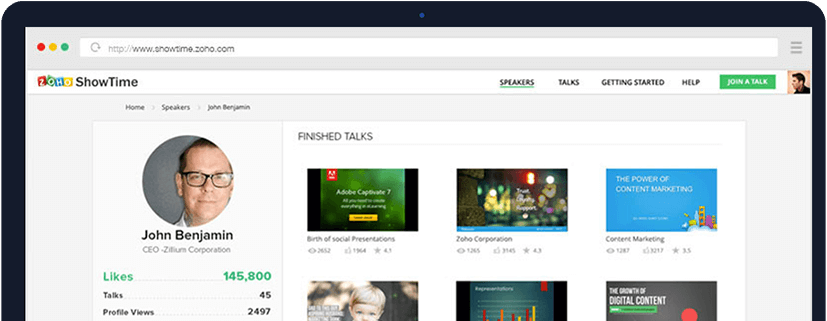
Zoho ShowTime - free interactive presentations with some cool features!


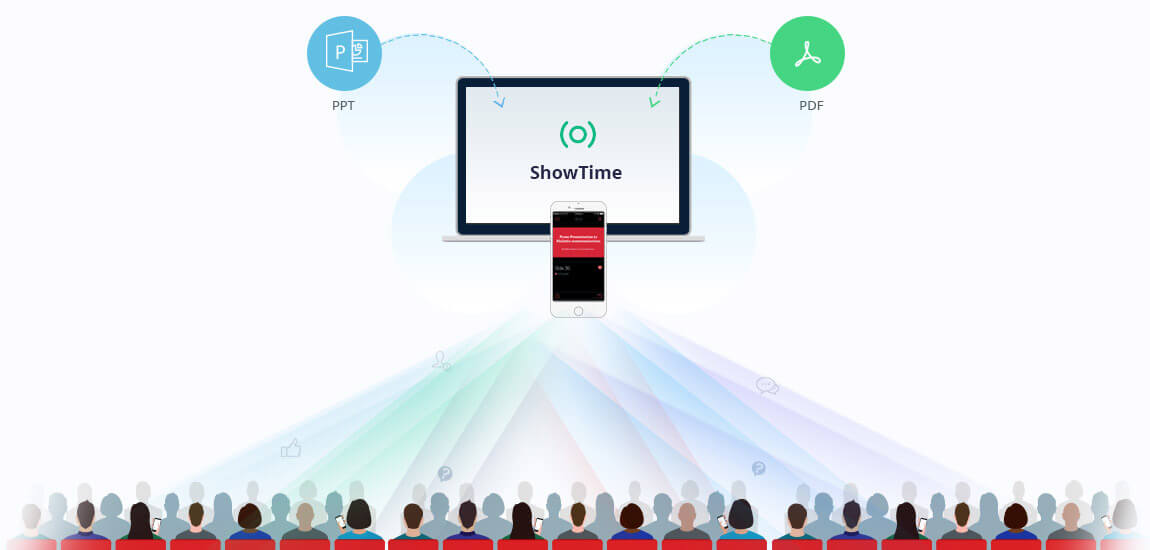
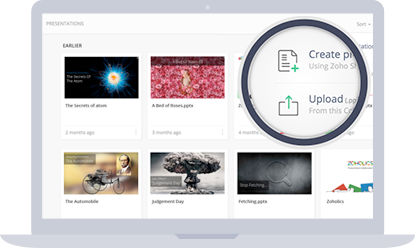
Zoho ShowTime is a very cool, free, tool that makes your presentations more interactive. It's easy to setup an account and then get started using it. You can import an PowerPoint presentation or PDF or create a new presentation right in it. (if you use Google Slides, just download it as a PowerPoint and then import).


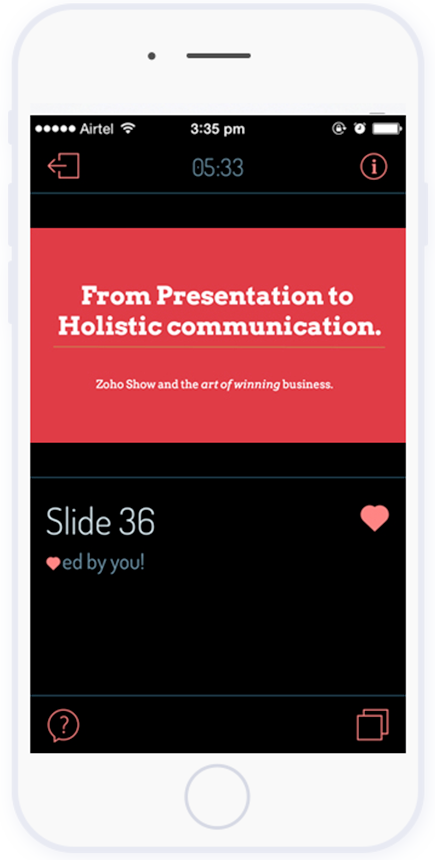
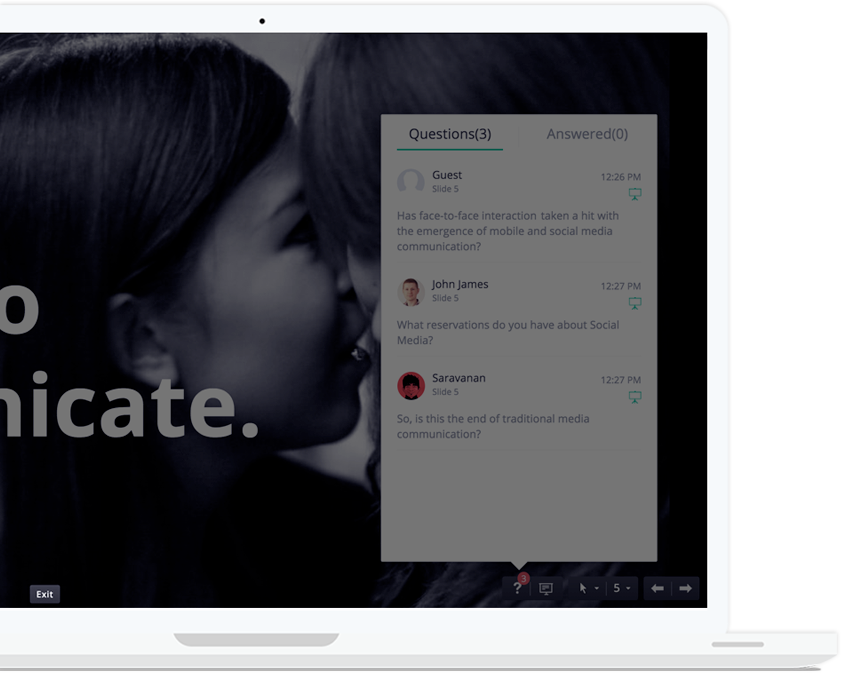
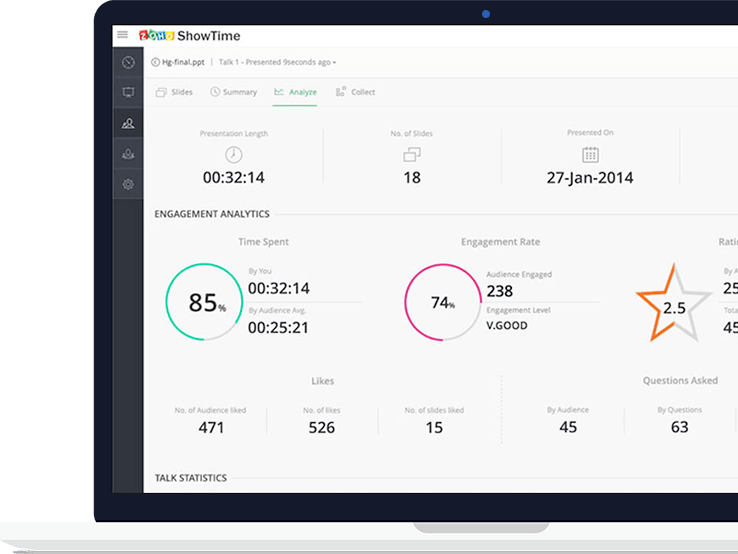
What's different about Zoho ShowTime is that it gives you live interaction with the audience as well as analytics. You can stream the slides out to the audience's devices, encourage your audience to like slides and ask questions (which you can answer immediately or later), project these questions to everyone, and then get metrics about the presentation and audience.

Zoho ShowTime mobile (iOS and Android) apps: https://www.zoho.com/showtime/mobile-apps.html 


Take a look at how it works.


The audience gets to follow along on their device, like slides and ideas, ask questions and then rate the presentation at the end.


You get an online profile with all of your presentations and metrics to share and to use to better yourself.


It is free, easy to use, and will help engage your audience and improve your presentations.

Great for teachers, trainers, and students.


Related:

Zoho - suite of on-line business, productivity & collaboration apps


--


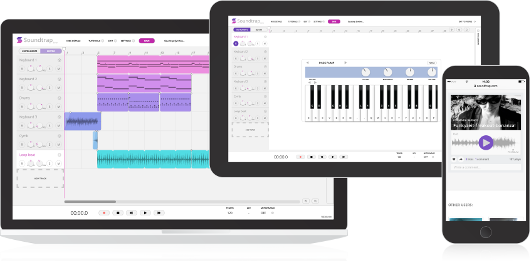
Soundtrap - make music online from any device!


Soundtrap is a new site that lets you make music online, from any device, with your own instruments or the virtual ones on the site. The free version offers 5 projects, 750 loops, 151 instruments and sounds and lots of other features. There are premium levels with more features and less limits.


Soundtrap works on Mac, Windows, iPad, Android tablets and phones, Linux and Chromebooks. It allows you to start, edit and collaborate on your recordings wherever you are. 

You can collaborate with others and even share your music on Facebook, Twitter and SoundCloud, as well as iTunes.

You can sign in with Office 365, Google, Facebook or an email account. 


This is a great tool that schools can use to help students learn and explore music. 

The Education version is in a walled garden and COPPA compliant and has different pricing than the consumer version. With this version, students and teachers are in their own private area and can more easily collaborate. Pricing is based on number of users - Starter Pack is $249/year for up to 50 users. You can use the online calculator to find pricing for more users. 

A great resource for schools, especially with all of the cuts to music an arts. 


-

Two infographics with tips for becoming a Power Google User!


Google is an excellent research and search tool, but there are some tips and features that a lot of people don't know about. These two inforgraphics have some great tips and information on getting more out of Google.

(click on image to view larger, or download and view)


 HackCollege.com 


----------------------------------

Apps for Touchscreen Chromebooks


Touchscreen Chromebooks are becoming more popular, and flip models like the Acer C738T are also getting popular. These Chromebooks open up some more options and features for students.

Here is a short list of apps that are great for touchscreen Chromebooks:


--

Explain Everything - Collaborative Whiteboard on any platform
Build a website with PageLines


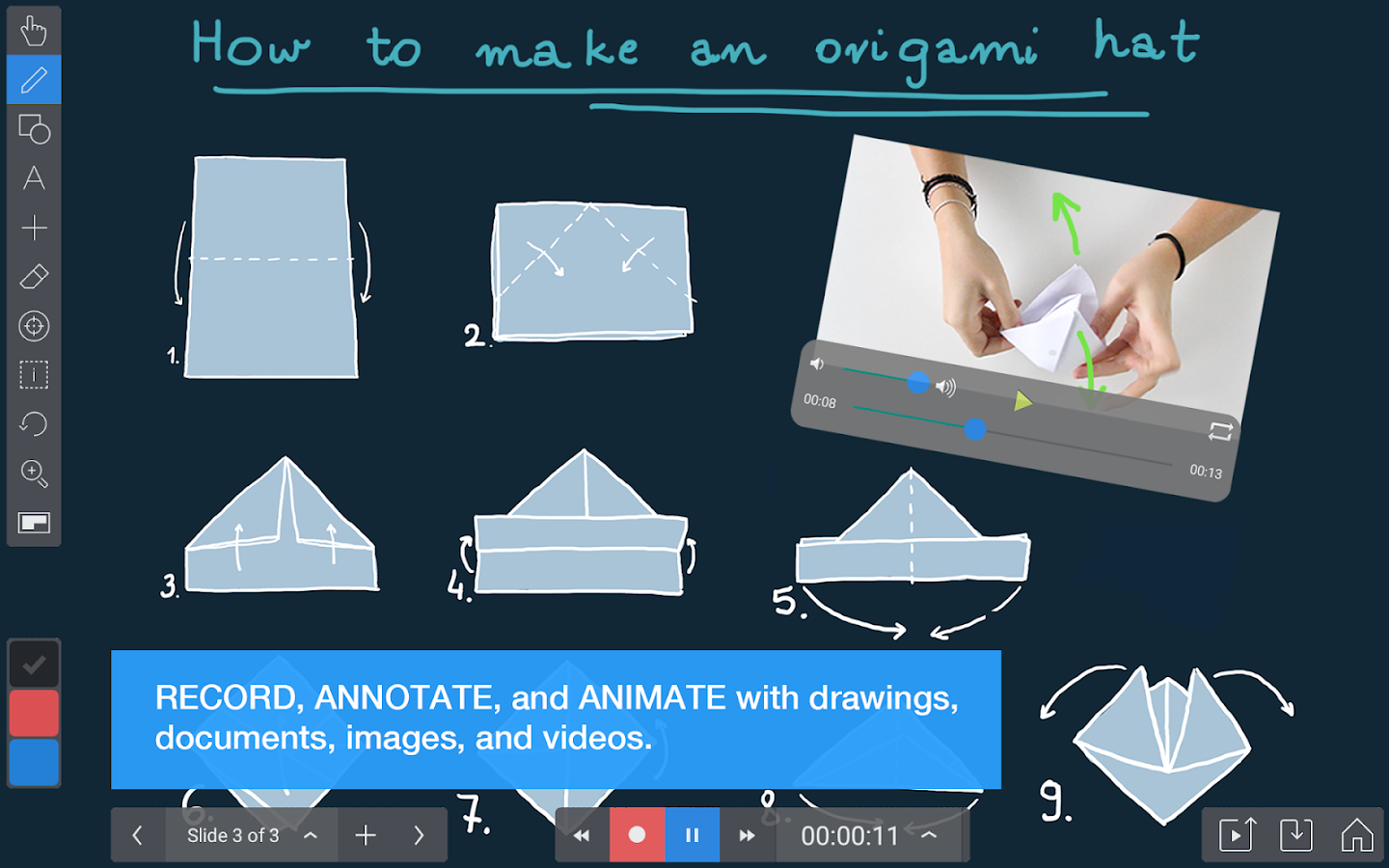
Explain Everything is a collaborative whiteboard app/site that is easy to use, has some great features, and works on all platforms, including Chromebooks (great for touchsreen ones). The free version includes access to viewer and collaboration features* of Explain Everything on iPad, Android, Chrome and Windows, and 100MB of storage on Explain Everything Discover. There are also premium versions with more features. 

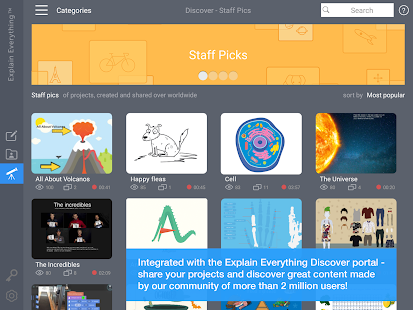
Explain Everything allows you to create animations and presentations, with voice over, screencasts,  and collaborate on the projects. In addtion, there is a huge repository of projects people have created with Explain Everything that you can access and use. You can also import different files into Explain Everything to use in your project.

This is a great tool for teachers and students:
- lesson presentations
- student presentations and projects
- collaboration tool for remote projects
- remote study help


  Explain Everything™ Whiteboard- screenshot thumbnail

   Explain Everything™ Whiteboard- screenshot
   Explain Everything™ Whiteboard- screenshot


Available on the App Store, Google Play, Windows Store, and Chrome Web Store.
(Explain Everything™ Collaborative Whiteboard will be available in the US on March 16th)


--

Wednesday, March 2, 2016

Assistive Technology and Accessibility Resources


One of the things I do in my role as a K-12 Education Strategist is work on resources for schools to use. I've been working on a resource document that has resoures on Assistive Technology and Accessibility and thought I would share it here:


Related:

More Accessibility Resources

Google Accessibility Features and Resources


-

Monday, February 1, 2016

EdTech Expo 16 - free educational technology conference - 2-12-16 Westchester NY


Ed Tech Expo 16 is a free educational technology conference being held on Friday, February 12, 2016 at the Westchester Marriot in Westchester, NY.

There will be some great sessions around edtech, along with vendors with demos and products.

"2016 looks to be a milestone year in educational technology. Curriculum and testing requirements are driving a move towards 1:1 and large scale mobile device deployments. This new model will require a fresh approach to traditional IT support infrastructure. Every aspect of a school's framework for technology will need to be evaluated and strengthened. This year EdTechExpo will be focusing on the technology and support needed to sustain this new paradigm."
Register and get more info below:

http://www.edtechexpo.com/ 

Friday, February 12, 2016
9:00 AM - 2:30 PM
Marriott Westchester
670 White Plains Road Tarrytown, NY 10591 Phone: (914) 631-2200


Our Blog

55 Cups
Average weekly coffee drank
9000 Lines
Average weekly lines of code
400 Customers
Average yearly happy clients

Our Team

Tim Malkovic
CEO
David Bell
Creative Designer
Eve Stinger
Sales Manager
Will Peters
Developer

Contact

Talk to us

Lorem ipsum dolor sit amet, consectetur adipisicing elit. Dolores iusto fugit esse soluta quae debitis quibusdam harum voluptatem, maxime, aliquam sequi. Tempora ipsum magni unde velit corporis fuga, necessitatibus blanditiis.

Address:

9983 City name, Street name, 232 Apartment C

Work Time:

Monday - Friday from 9am to 5pm

Phone:

595 12 34 567