We Are Creative Design Agency

Lorem ipsum dolor sit amet, consectetur adipisicing elit. Illum, fuga, consectetur sequi consequuntur nisi placeat ullam maiores perferendis. Quod, nihil reiciendis saepe optio libero minus et beatae ipsam reprehenderit sequi.

Find Out More Purchase Theme

Our Services

Lovely Design

Lorem ipsum dolor sit amet, consectetur adipiscing elit. Praesent feugiat tellus eget libero pretium, sollicitudin feugiat libero.

Read More

Great Concept

Lorem ipsum dolor sit amet, consectetur adipiscing elit. Praesent feugiat tellus eget libero pretium, sollicitudin feugiat libero.

Read More

Development

Lorem ipsum dolor sit amet, consectetur adipiscing elit. Praesent feugiat tellus eget libero pretium, sollicitudin feugiat libero.

Read More

User Friendly

Lorem ipsum dolor sit amet, consectetur adipiscing elit. Praesent feugiat tellus eget libero pretium, sollicitudin feugiat libero.

Read More

Recent Work

Tuesday, December 29, 2015

Backupery - free backup of Evernote and Google Bookmarks for Education users

Image result for www.backupery


Backupery is a service that provides back up of your Evernote Data and Google Bookmarks.

It is free for education users. Backupery provides free licenses for teachers, students, or faculty members at a qualified academic institution, high school, university, or community college. The process to get the license is very simple - a user just needs to contact us and provide his/her name, and name of the institution or URL of the institution web page. http://www.backupery.com/edu/,

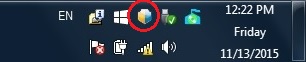
Backupery for Evernote is a Windows software application that performs regular backup of your Evernote data. This backup can be saved to your computer, external hard drive, USB memory, Google Drive and much more. It is easy to use and setup, easy to restore your date, backups attachments, works in the background, is secure and even has de-duplication and free space optimization.
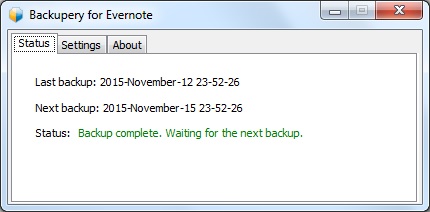
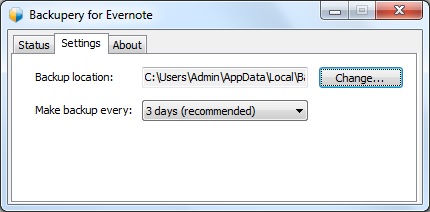
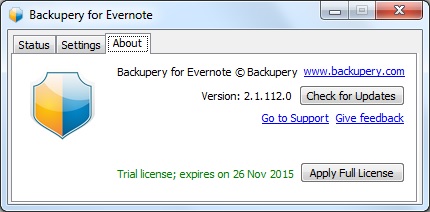
Backupery for Chrome Bookmarks is a Windows software application that performs regular backup of your Google Chrome bookmarks. This backup can be saved to your computer, external hard drive, USB memory, Google Drive and much more. It is easy to use and setup, easy to restore your date, backups attachments, works in the background, is secure and even has de-duplication and free space optimization.

It is very important to have backups of your data. When I was CIO, I had my school district backing up all data to Barracuda Backup (on premise and 3 offsite) and had all of our Google Apps for Education data backed up with Backupify.

I backup my personal Google Drive files using the Google Drive sync app, and I do regular backups using Google Takeout of all of my Google Data. I also do regular exports of my Evernote data. All of my backups are also copied to an external hard drive, which I store in a fire-proof safe. I will now be using Backupery to also backup Evernote. I was using Revert.io but they were bought by another company (ThisData) and are no longer free (they do have excellent tools, including Google Admin, and pricing though).


Tuesday, December 15, 2015

Benefits of Google Apps and Chromebooks for Schools


Google Apps for Education New logo.png

chromebooks-apps-flyout-in.jpg
Benefits of Google Apps and Chromebooks
Updated version of this as a Google Doc: https://goo.gl/zbcAA2 


How does Google Apps and Chromebooks compare to Apple or Microsoft inside the classroom?
  • Google Apps and Chromebooks are extremely easy to use. Students and teachers can access thousands of web apps and extensions, most free, as well as everything on the internet.  
  • Schools using Chromebooks have great experiences with limited issues or concerns.
  • Unlimited file storage on Google Drive (any type of file)
  • plenty of resources to help teachers use them to improve teaching and learning
  • can use Office Editing (free app) in Docs, Sheets and Slides to edit Word, Excel and PowerPoint files
  • can use Office 365 or any web based software
  • can be used as the only device, or in a mixed device environment
  • huge community of users that share and support each other (over 50 Millions users of GAFE!!)
  • Google Classroom is a game-changer…it allows teachers to share resources and communicate with students, distribute, collect and grade assignments, and so much more.  Google Classroom resources for Educators


Resources for Teachers:


How do they manage a Chrome device versus an Apple or Microsoft device from an admin perspective?  
  • Chromebooks are extremely easy to manage, whether managing 30 or 30,000
  • Management is done through web based admin console from anywhere, on any device
  • do not have to physically touch the devices once they are enrolled
  • settings, apps, etc are all pushed out almost instantly
  • over 170 settings can be managed
  • manage users, networks, devices, apps, and much more
  • import users from a variety of systems into Google Apps easily
  • easiest devices to manage
  • no re-imaging,
  • easily shared in as a multi-user shared device


Technical Resources:


What is the ROI and price?  
  • huge ROI and low prices
  • GAFE is free
  • most web apps are free (even when the iPad app had a fee)
  • easy to use so they get used all the time in class (and <7 second start up)
    • Example - 1000 students - 3 year total cost of ownership
    • Windows PC $6,213,000
    • Chromebooks $1,071,000 - savings of $5,141,000 !!! (that is 82 % less)
    • Mac and Apple are  similar to or even higher costs than Windows (higher hardware costs, more labor to deploy and manage, software costs)
  • Example:
  • iPad: $399 + $99 Apple Care + $99 keyboard + $49 case = $646
  • Chromebook: $299 + $30 license  = $329 – half the price of an iPad
    • A Chromebook ($329) and a Nexus 7 tablet ($199 + $30 license + $30 case = $259 ) (Total $588) can both be purchased for less than the price of just one iPad
  • Chrome web apps are 95% free
  • iPad apps, while there are free ones, are more fee based and license is non-transferable
  • Windows devices have higher up-front cost, are harder to manage, require more IT support, Antivirus and more.
  • Most users are using web-based apps anyway, or there is a web based version available


* Easy to use, inexpensive, easy to manage, great training and PD resources, you can do anything on them. *


Thursday, October 29, 2015

Lots of great resources and web apps to use with Chromebooks!


You can do pretty much anything with a Chromebook so the sky's the limit. Here are some tips and links to web apps:


-

Friday, October 16, 2015

Turn any exisiting PC or Mac into fully functional Chromebook - for free!


Neverware, a startup that has developed a software product, CloudReady, in partnership with Google, which turns almost any computer from the last 8 years into a full-fledged Chromebook.

Since launching this spring in the K-12 education market, they've deployed CloudReady in over 100 school districts, helping them dramatically extend the life and functionality of their existing computers. Earlier this month they quietly released a completely free version of the product for individual use, and they've had really positive feedback from the IT & enthusiast communities,


Yesterday, they officially announced the free version for individual use to the public. Imagine being able to use that old PC or Mac you have lying around as a Chromebook. It will run faster and better than it used to and provide you with more years of useful life for your old devices.

I'm going to install it on my old laptop and netbook and see how it goes.


If you want to use this in your school and managed the devices through the Admin Console, contact Neverware for more info. 

Check it out!


Neverware’s CloudReady converts existing computers into fully functional Chromebooks

NEW YORK – October 15, 2015 – Neverware announced the availability of a free version of CloudReady, an operating system that, in partnership with Google, turns almost any existing PC or Mac into a fully functional Chromebook.
Like the paid version of CloudReady, the free offering has been certified by Neverware on nearly 200 computer models and can be used on hundreds of others. Both versions include automatic updates and simple installation from a USB thumb drive. Since CloudReady is based on the same code that powers Chromebooks, it offers complete and secure integration with Google Apps and other Google services.

“We’re very excited to be able to offer a free version of CloudReady,” said Neverware CEO Jonathan Hefter. “This will allow users around the world to have free access to the simplicity and speed of Chromebooks, using the computers they already have.”
The paid version of CloudReady, which offers dedicated support and integration with Google’s device management console, launched in spring 2015. It has already been purchased by over 100 school districts in the United States, and CloudReady pilot programs are underway with organizations in 10 countries.

“Our teachers are amazed that they are using the same hardware - the difference in student engagement is astounding.”, commented Dawn Young, Director of Educational Technology at Binghamton School district in New York. “As we move to learning environments that require increased access to technology, CloudReady has been a great way to increase our device to student ratio.”

CloudReady can be downloaded for free at neverware.com

About Neverware
Neverware is a New York-based developer of operating systems. Its flagship product, CloudReady, enables school districts and other organizations to cost effectively transform their existing hardware into simple, secure, and fast machines that can be managed right alongside Chromebooks.

Neverware recently launched a joint initiative with Google to let organizations that have never tried Chromebooks to do so, cost-free, using CloudReady. Neverware’s investors include Khosla Ventures, General Catalyst, Rethink Education, and Collaborative Fund.
Product images, case studies, company bios and additional quotes are available at: www.neverware.com/media


Related:

Google Apps and Chromebooks Resources


-


Our Blog

55 Cups
Average weekly coffee drank
9000 Lines
Average weekly lines of code
400 Customers
Average yearly happy clients

Our Team

Tim Malkovic
CEO
David Bell
Creative Designer
Eve Stinger
Sales Manager
Will Peters
Developer

Contact

Talk to us

Lorem ipsum dolor sit amet, consectetur adipisicing elit. Dolores iusto fugit esse soluta quae debitis quibusdam harum voluptatem, maxime, aliquam sequi. Tempora ipsum magni unde velit corporis fuga, necessitatibus blanditiis.

Address:

9983 City name, Street name, 232 Apartment C

Work Time:

Monday - Friday from 9am to 5pm

Phone:

595 12 34 567